
 July 6, 2021
  6 min to read
 Travel and Expense

The travel and expense reporting Application makes it easy to track expenses, mileage and deductions during your travels and automatically creates an Expense Sheet in IFS for processing.
Mobile Work Order
Mobile Work Order is an Enterprise Asset and Service Management Application that helps technicians perform maintenance and other service-related activities while in the field.
Warehouse
The Start Warehouse Task is one of 29 other Warehouse Management Applications on the Marketplace that helps to automate warehouse data management tasks in IFS using mobile scanners.
Improve now
See our entire collection of applications to streamline your operations and much more.

Related articles
:

Almost every enterprise IT leader has heard the pitch by now: write down what you want, and AI will build the app for you in minutes. “Vibe coding” – building software by prompting an AI rather than writing code – promises to finally close the gap between what the business needs and what IT can deliver. It’s a compelling promise. But for mid-sized and large enterprises, where applications need to talk to ERP systems, respect data governance, and stay reliable for years, the question isn’t whether AI can generate an app quickly. It’s whether that app can be trusted to run your business. When Vibe Coding Meets Reality The productivity gains from AI-assisted development are real. So are the growing pains. As more AI-generated code lands in production systems, a consistent set of problems keeps surfacing: Security – AI models can confidently generate code that looks correct but contains exploitable flaws, often without any obvious warning sign. Maintainability – Code produced without an underlying architecture tends to become “disposable”: easy to generate, hard to extend, and expensive to fix once it’s live. Compliance – Regulations like the EU AI Act are starting to hold organizations accountable for how AI-generated systems behave, not just how fast they were built. Deployment – Freely generated apps often have no consistent path to production, versioning, or rollback. Transparency – When nobody can explain why an AI-built application does what it does, auditing and troubleshooting become guesswork. None of this means AI-assisted development is a bad idea. It means it needs a framework. What AI On Rails Actually Is Novacura Flow includes an AI application builder – customers describe a workflow in plain language and get back a working, ERP-connected app. That much sounds like every other AI app builder on the market. The difference is what happens underneath. Instead of generating raw, freeform code, the AI in Novacura Flow generates a workflow – a structured sequence of steps assembled from Flow’s own components, connectors, and runtime primitives. It isn’t writing arbitrary source code that could do anything a programming language allows; it’s composing an application out of a fixed, pre-approved vocabulary that the platform already knows how to run safely. That’s also why the “rails” framing holds up rather than being just a marketing label: the AI has real creative latitude in how it sequences and configures those building blocks, but it never gets access to the primitives it would need to step outside them – there’s no raw database connection to write, no custom authentication logic to invent, no unmanaged way to reach an external system. Which is why it stays on rails: not because the AI has been instructed to behave, but because the architecture doesn’t give it anywhere else to go. Every AI-generated app automatically inherits the same runtime engine, the same managed connector pool, the same user and role model, and the same versioning and deployment pipeline as an app built by hand. The AI is never in a position to define its own security model or invent a new way of talking […]

Talk to any production manager running Infor M3 and you’ll hear a version of the same story: the ERP logic is right, but it’s always the last one to know. An operation finishes on the line, but the run time isn’t logged until the operator walks back to a desk-bound terminal an hour later. Material is physically consumed at the workstation, but the digital balance stays untouched because the standard M3 screens are too rigid for one-handed, glove-on entry in a noisy plant. M3 isn’t wrong — it just hasn’t been told yet. That lag between physical execution and digital record is where production efficiency KPIs quietly erode, and closing it means rethinking how shop-floor data reaches the ERP in the first place, not rethinking the ERP. What Manufacturing Execution Truly Means Manufacturing Execution is not merely about producing goods; it is the real-time synchronization of what physically happens at the workstation with what your ERP believes is happening. It is the precise moment a component is issued to a manufacturing order, an operation is reported complete, or a finished pallet becomes available stock ready for the next process. For production and plant managers, it is measured by unforgiving KPIs: operation-time accuracy, material consumption variance, first-pass yield, order confirmation lead time, and overall shop-floor throughput. Every one of those numbers depends on a single condition — that the reporting happens at the point of work, not at the end of the shift. How Infor M3 Handles Shop-Floor Execution Infor M3 is a robust ERP engine, designed for complex multi-site planning, deep manufacturing order logic, costing, and traceability. The transactional foundation is genuinely strong. The friction appears at the interface. The standard M3 client was built for a desk, a mouse, and a full keyboard — not for a scanner in a gloved hand next to a running machine. Infor’s native mobile options exist, but they are built around fixed, out-of-the-box workflows that rarely match a plant’s exact SOPs without heavy configuration effort. When those workflows don’t fit, operators fall back on the oldest tools in the building: paper travelers, tally sheets, and a shared terminal at the end of the aisle. The floor moves faster than the data entry, and the result is a familiar set of downstream symptoms — material planning driven by stale balances, operation times that arrive too late to act on, and rework discovered long after the batch has moved on. Why Use the Manufacturing Execution App Package? To close this operational gap, Novacura developed a dedicated Manufacturing Execution application package for Infor M3. This pre-built suite covers the manufacturing order lifecycle with mobile-friendly applications built specifically for M3’s production processes — spanning inhouse and shop order-related workflows across most of the crucial steps on the production floor. Rather than attempting to replace or heavily customize Infor M3 — which risks system stability and complicates future upgrades — the package acts as a mobile, offline-capable workflow execution layer. It translates complex M3 programs into sequential, conditional steps tailored specifically for an operator holding an industrial scanner or a phone at the line, guiding them task by […]
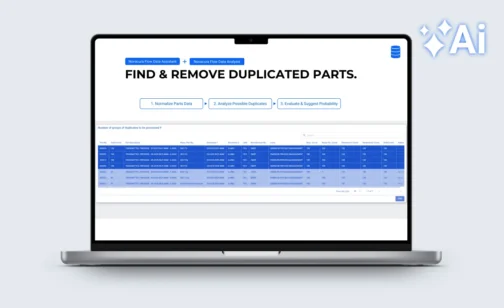

Every software vendor has an AI story right now – most of them built on the same idea: let AI generate an app from a prompt and see what happens. The problem is well-documented. Research from Veracode found that 45% of AI-generated development tasks produced code with critical security flaws. In enterprise ERP environments, where security, compliance, audit traceability, and reliable ERP connectivity are non-negotiable, that is not a viable foundation. Novacura Flow is also an AI application builder — but built on a different premise. AI is placed within a well-controlled enterprise framework: governed ERP connectors, role-based access, workflow transparency, version control, and consistent deployment. Novacura calls this AI on Rails. The AI accelerates development and drives user interactions; the framework ensures it behaves correctly in production. The practical result is visible in three categories of AI capability in Flow, demonstrated recently in a live session by Novacura’s Petter Larsson and Greg Warner — including working demos against IFS. Watch: How to build AI-powered apps on top of your ERP. A 20-minute walkthrough by Novacura Product Manager Petter Larsson and Solutions Engineer Greg Warner, covering three categories of AI in Flow with live examples. When AI actually makes sense in an ERP workflow The core challenge with AI adoption in industrial enterprises is not access to models – it is access to the right data, at the right moment, in the right context. Novacura Flow solves this because it already sits between frontline workers and the ERP. It collects operational data at the exact location where transactions happen, at a level of granularity most ERP interfaces cannot match. From that position, Flow can feed AI services with clean, structured, real-time data – and return the results directly into the workflow. This is the difference between an AI chatbot that summarizes information and an AI layer that acts on it. The practical applications fall into three categories: Making sense of large ERP datasets ERP systems accumulate data over years — and that data degrades. Parts masters drift. Duplicates accumulate. Naming conventions diverge across sites or business units. Manual cleanup is slow and expensive. AI handles it well. Novacura Flow addresses this natively, bringing data intelligence directly into the workflow layer. Users can normalize, harmonize, and deduplicate master data, as well as query and analyze data on the fly — across any connected ERP, database, or system. These capabilities are designed to slot into Flow as native workflow steps — not REST calls to an external API — keeping data processing inside the governed framework, and putting real data quality and insight directly in the hands of end users. The example: parts data quality and deduplication The Data Assistant first normalizes parts descriptions — consistent format, standardized naming — and then Data Analysis identifies probable duplicates across the catalogue. The result surfaces as a list of suggested actions for an operator to review and confirm. AI does the pattern recognition. A person makes the final call. The workflow logic, the ERP write-back, and the audit trail are all handled […]
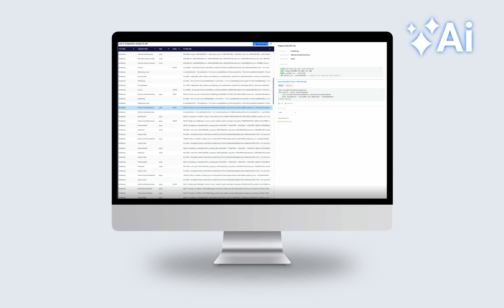
Safeguarding Your Migration Investment Novacura supports customers across the full ERP lifecycle – ERP orientation isn’t a marketing tagline, it’s our core mission. So when many of our customers began navigating the upgrade to IFS Cloud, we saw the same friction point emerge: the ERP upgrade itself isn’t the hardest part. It’s what happens to the Flow solutions built around it. IFS Applications and IFS Cloud don’t just differ in version — they differ in kind. One relies on classic Oracle PL/SQL APIs; the other is a modern cloud platform built on OData and REST. Bridging that gap demands specialized knowledge most teams simply don’t have on hand. That’s why we built the IFS Migration Tool for Flow. It automates the conversion of Flow applications built for IFS Applications, carrying your business logic forward into IFS Cloud with speed, transparency, and measurable cost savings – typically cutting migration effort by more than 50%. The tool processes workflows from both Flow Classic and Flow Connect, focusing specifically on the machine steps responsible for IFS interaction and converting them automatically. The heavy lifting is done. Final assembly remains with your development team. This is not an ERP data migration tool. It protects the Novacura Flow investment your organization has built over the years – and ensures it carries forward into IFS Cloud, not into a rewrite backlog. Our Solution: Ifs Migration Tool For Flow The Migration Tool can process workflows from both Flow Classic and Flow Connect, but the output is always generated for Flow Connect. The tool focuses only on machine steps responsible for IFS Apps interaction and converts them (SQL or PL/SQL blocks) into corresponding Flow Script blocks for IFS Cloud (1:1). In the generated Flow Script, the tool fully utilizes Flow Script Modules generated to wrap IFS API endpoints (Flow Script does not call OData endpoints directly, but only through the available FS Modules). While the tool provides significant relief by automating the conversion of logic, it is currently machine-step-oriented. It retrieves and converts the steps, but does not inject the code back into the final workflow automatically; this final assembly remains in the hands of the developer. Furthermore, while the tool can process legacy Flow Classic workflows, the output is always generated for Flow Connect, aligning your environment with the latest technical standards. Note: This tool focuses exclusively on converting workflows between the two IFS product lines. It does not perform the ERP data migration itself, nor does it support a generic “Classic to Connect” migration outside of the IFS version context. Who is this for? This specialized tool is engineered for Novacura Flow users who have developed a robust ecosystem of applications for IFS Applications and now face the strategic necessity of aligning those assets with the IFS Cloud environment. It is built specifically for organizations that recognize the profound technical leap required to move from legacy Oracle PL/SQL APIs to the modern OData projection catalog, ensuring that existing business logic is not abandoned, but rather seamlessly transitioned into the new cloud-native architecture. Precision At Scale (The 10-level Complexity Scale) We do not view migration as a “black box” process. To provide total transparency, the tool classifies every workflow step into 10 complexity levels: Levels 1–3 […]
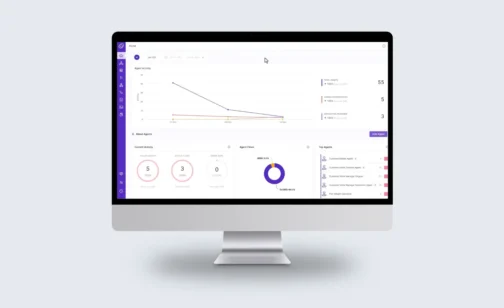
For years, the promise of Artificial Intelligence in manufacturing has been hindered by a fundamental disconnect. While modern ERPs can predict a machine failure or a supply chain delay with startling accuracy, the “last mile” of that insight – getting a human or a system to actually do something about it – in many cases remains manual, fragmented, and slow. This is the Industrial AI Paradox: we are data-rich but execution-poor. With the introduction of IFS.ai and the 2025 acquisition of TheLoops — now integrated as IFS Loops — ERP is evolving into something fundamentally different: a system of action, capable of autonomous execution, real-time decision-making, and continuous operational orchestration. This shift is not incremental. It is architectural. IFS.ai: Intelligence As An Infrastructure IFS has fundamentally rejected the “AI-as-an-add-on” philosophy. Through IFS.ai, they have built an infrastructure where artificial intelligence is a core component of the ERP architecture. This isn’t just about generating text; it’s about industrial-grade predictive and prescriptive logic. For a Logistics Manager, this means the system doesn’t just record that a shipment is late. IFS.ai analyzes the impact of that delay on downstream production schedules, evaluates the shelf-life of the raw materials involved, and recommends a specific rerouting strategy to minimize financial loss. It is pervasive, touching everything from Enterprise Asset Management (EAM) to Service Management. For more insights on IFS.ai check out: IFS Cloud – IFS.ai The Strategic Shift: Why IFS Acquired TheLoops To understand where industrial software is heading, we must look at the 2025 acquisition of TheLoops. Traditional ERP systems act as “systems of record,” storing and reporting data after events occur. With the emergence of agentic AI platforms like IFS Loops, ERP evolves into a system of action — autonomously executing multi-system processes and making context-driven decisions while humans focus on high-value exceptions. IFS Loops: The Rise of the Digital Worker IFS Loops introduces the concept of the Digital Workers, specialized autonomous AI agents capable of context-aware decision making and execution across enterprise systems. Unlike rigid RPA scripts, they dynamically plan and perform complex tasks such as order management or maintenance scheduling with significant operational impact. To understand the breadth of this technology, we can categorize these agents by the operational “Villains” they defeat: The Supplier Order Manager (The Procurement Sentinel): In a traditional setup, if a supplier changes a delivery date via email or a portal, a human must read the notification, check the ERP, assess the impact on production, and manually update the purchase order. The Loop: The Digital Worker monitors these external signals autonomously. It identifies a 48-hour delay, cross-references it with current safety stock levels in IFS Cloud, and—if the delay doesn’t risk a line-stop—it updates the PO and notifies the planner. If it does risk a line-stop, it automatically flags the exception for immediate human intervention. The Demand & Inventory Replenisher (The Capital Optimizer): Manual replenishment often relies on “gut feeling” or static reorder points that don’t account for seasonality or sudden market shifts. The Loop: This agent continuously analyzes consumption patterns against external market signals. If it detects a trend—for example, a sudden spike in demand for a specific […]
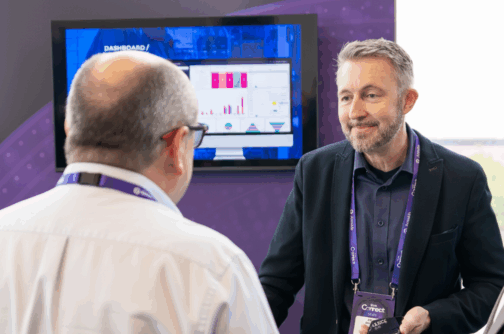
Usability is becoming the defining factor in ERP efficiency. In this interview, Aksel Jarlbäck explains how Novacura is transforming the Infor M3 experience by making business applications intuitive, user‑friendly, and adaptable.


