
 June 10, 2026
  7 min to read
Watch: How to build AI-powered apps on top of your ERP. A 20-minute walkthrough by Novacura Product Manager Petter Larsson and Solutions Engineer Greg Warner, covering three categories of AI in Flow with live examples.
The core challenge with AI adoption in industrial enterprises is not access to models – it is access to the right data, at the right moment, in the right context. Novacura Flow solves this because it already sits between frontline workers and the ERP. It collects operational data at the exact location where transactions happen, at a level of granularity most ERP interfaces cannot match.
From that position, Flow can feed AI services with clean, structured, real-time data – and return the results directly into the workflow. This is the difference between an AI chatbot that summarizes information and an AI layer that acts on it.
The practical applications fall into three categories:
- Making sense of large ERP datasets
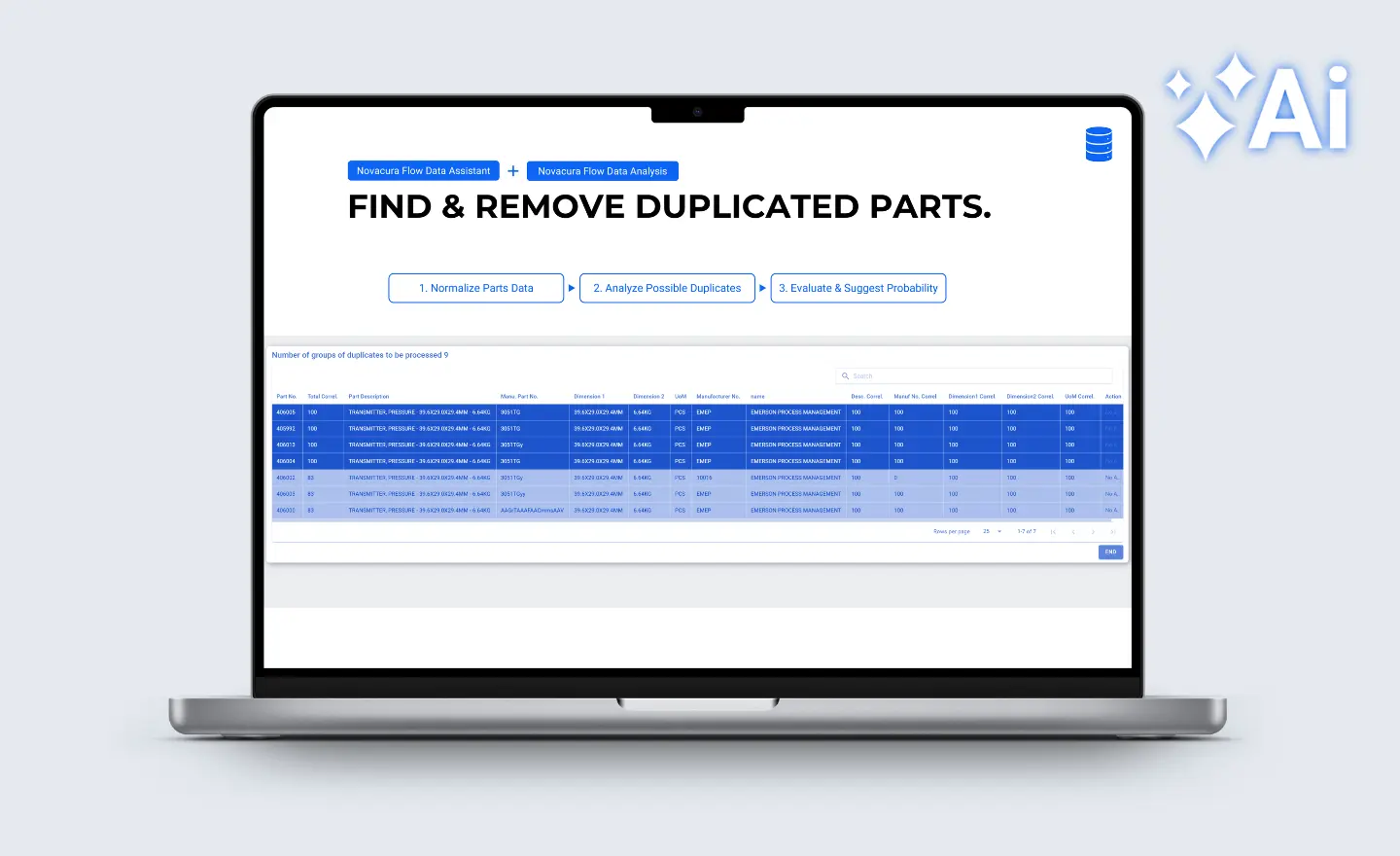
ERP systems accumulate data over years — and that data degrades. Parts masters drift. Duplicates accumulate. Naming conventions diverge across sites or business units. Manual cleanup is slow and expensive. AI handles it well.
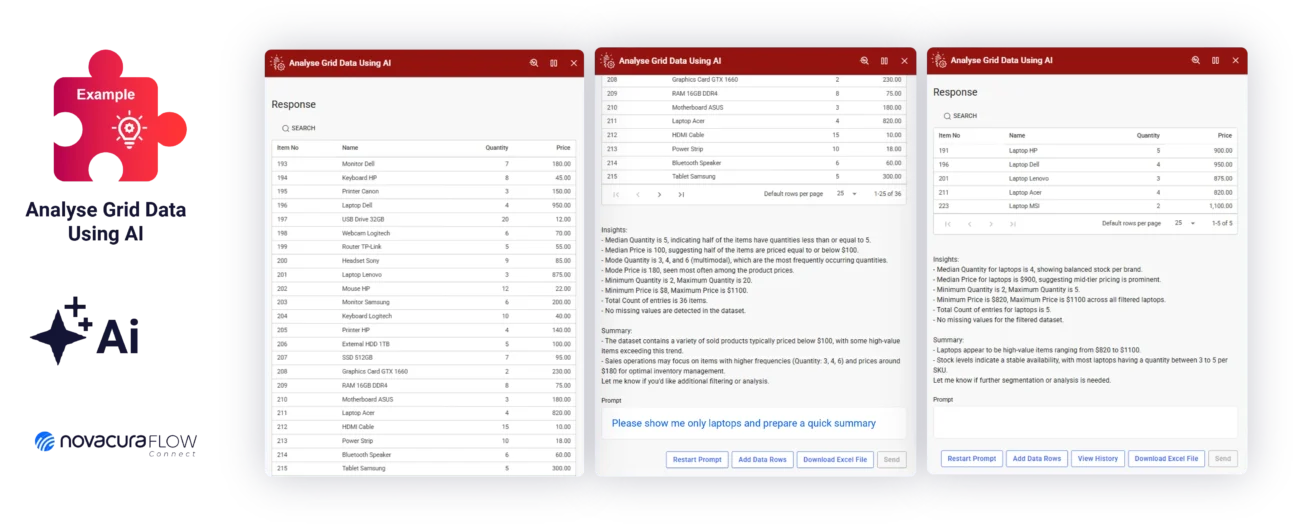
Novacura Flow addresses this natively, bringing data intelligence directly into the workflow layer. Users can normalize, harmonize, and deduplicate master data, as well as query and analyze data on the fly — across any connected ERP, database, or system. These capabilities are designed to slot into Flow as native workflow steps — not REST calls to an external API — keeping data processing inside the governed framework, and putting real data quality and insight directly in the hands of end users.
The example: parts data quality and deduplication
The Data Assistant first normalizes parts descriptions — consistent format, standardized naming — and then Data Analysis identifies probable duplicates across the catalogue. The result surfaces as a list of suggested actions for an operator to review and confirm. AI does the pattern recognition. A person makes the final call. The workflow logic, the ERP write-back, and the audit trail are all handled by Flow, within the enterprise framework.
- Turning unstructured documents and images into ERP data
A significant share of the data that should live in an ERP arrives in formats the ERP cannot read: supplier PDFs, scanned delivery notes, photographs from the production floor. Getting that information into structured records has historically required manual re-entry — slow, error-prone, and costly.
Novacura Flow connects to document intelligence services — including Azure Document Intelligence — and vision AI models to extract structured data from those inputs automatically, then routes it through standard Flow workflow logic. The AI service does the extraction. Flow handles the validation, routing, and ERP write — using the same controlled connector architecture that governs all ERP interaction in the platform.
Example 1: Supplier invoice automation
A supplier PDF arrives. Azure Document Intelligence parses it into structured data. A Flow workflow validates GL coding, sets approval routing based on supplier and amount, and creates the invoice record in IFS or Infor M3 with correct postings. The AI never touches the ERP directly — it extracts and structures data, and Flow takes it from there through the governed connector layer.
Example 2: Vision-based quality detection
A camera above a production line captures images as items pass. A vision AI model detects defects. When an issue is found, Flow immediately triggers a quality workflow in the ERP — flagging the batch, routing a non-conformance, notifying the relevant team. Machine vision for quality detection already exists at many manufacturers. What is typically missing is the connection to the ERP so that a detected problem becomes an action. That connection is exactly what Flow provides.
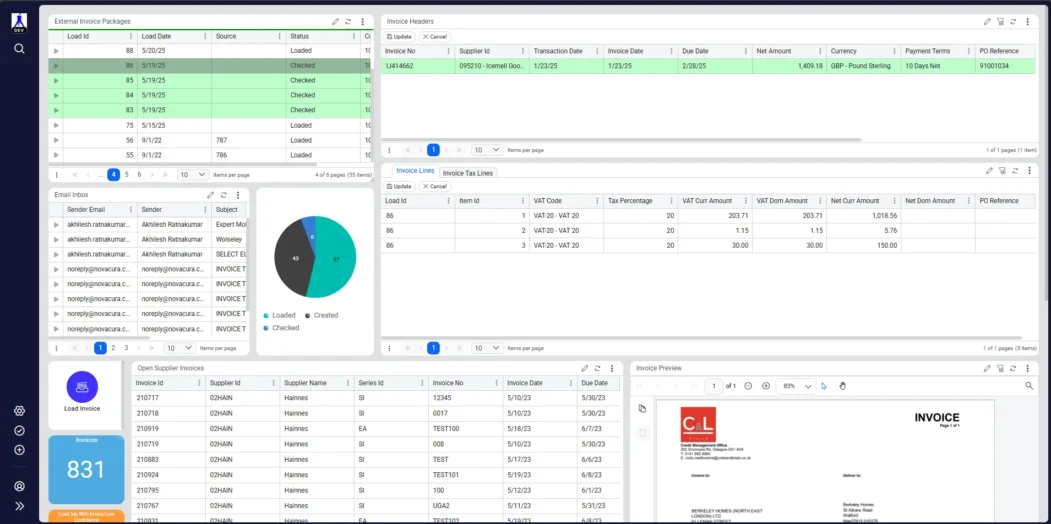
The Supplier Invoice Automation app streamlines the invoice intake process by automatically extracting and validating supplier invoices and creating manual invoices in IFS.
- AI that understands intent and drives the workflow
This is the category that most directly challenges the traditional ERP interaction model. Instead of an operator navigating menus and filling in fields, they describe what they want to do — by typing, or by speaking. The AI determines intent, collects required parameters, and routes the Flow application to the correct execution step.
This is where the ERP Fusion Engine matters most. To build an intent-driven agent that works correctly with IFS and Infor M3, the AI needs to understand ERP processes, nomenclature, and API structure — not just natural language. Novacura built a domain-optimized knowledge model specifically for this: the ERP Fusion Engine, which covers ERP objects and their hierarchy, standard business processes, UI action patterns, and API endpoints. AI is only as good as its domain knowledge. For ERP applications, that means the AI must understand the ERP way of thinking, not just general software patterns.
Warner built the live demo using the OpenAI Responses API, which allows Flow to define a JSON schema for AI responses — so output is structured and machine-readable, not free-form text. Flow parses it and makes workflow routing decisions based on it. A reusable intent assistant component loops between the user and the model until the AI has identified the goal and gathered all required parameters. Then a decision step routes to the appropriate Flow workflow.
None of the examples in this session required replacing or deeply modifying the ERP. The ERP remained the system of record. Novacura Flow sat in front of it, handling user interaction, AI orchestration, workflow logic, and ERP write-backs — all through controlled connectors that enforce user impersonation, role-based access, and audit traceability. The AI generated behavior; the framework governed it.
For manufacturing, field service, and logistics teams running IFS or Infor M3, the practical starting points are straightforward:
- Parts data quality: if your parts master has accumulated duplicates and inconsistencies, the Flow Data Assistant and Data Analysis combination addresses it directly.
- Invoice automation: if your AP team is still keying supplier invoices manually, the Azure Document Intelligence integration with Flow removes that work without touching the ERP core.
- Conversational shop floor apps: if your operators spend more time navigating ERP screens than doing production work, voice-driven intent agents offer a fundamentally different interaction model — one that is governed, auditable, and built for industrial conditions including offline mode, barcode scanning, and machine connectivity.
For organizations running IFS Applications 10 who have been unable to move to IFS Cloud because of customization debt, Novacura’s AI-powered workflow converter is also in active development — reading existing PL/SQL logic, understanding it functionally, and converting it to IFS Cloud-compatible FlowScript. The same ERP Fusion Engine that powers the intent agents powers the converter. The target is automating 50 to 80 percent of that migration analysis.
AI in enterprise ERP is not about giving language models access to your systems and seeing what happens. It is about finding the cases where AI genuinely reduces work — and building the governance layer that makes it safe to deploy at scale.
That is what AI on Rails means in practice.
Watch the full recording: How to build AI-powered apps on top of your ERP.
Including the live shop floor agent demo running against IFS.