 ..
..

Flow Connect Upgrade Service

3. PREPARATION TO UPGRADE
The upgrade project always begins with a preparation phase. This phase is not part of the upgrade service itself (covered by the upgrade contract), but Novacura provides support to help the customer better prepare for the actual upgrade project.
The stages of the preparation phase are illustrated on the diagram below:
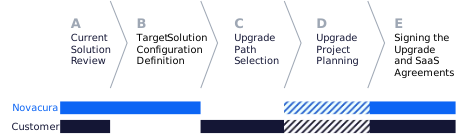
The involvement of Novacura and the Customer in particular stages is dependent on the upgrade path chosen by the customer and will be describer in the chapters below.
A. Solution review [Novacura Product Management]
- Novacura presents the overall migration methodology and techniques (tools to automate migration)
- Novacura organizes customer interview to walk through the Upgrade Questionnaire, to determine the customer’s readiness for the Flow Connect version. Novacura checks used connectors and portlet types, complexity of apps, and advanced features (like custom connectors) used in customer’s solution. The Customer actively participates in the interview, presenting the solution.
- Novacura summarizes the Upgrade readiness, pointing challenging areas, where a specific solution (or workarounds) must be implemented (if applicable)
B. Target Solution Configuration Definition [Novacura Product Management]
- Novacura suggests Flow Connect configuration (adequate connectors, technical setup)
- Novacura informs about the technical means the customer should provide (connectivity, hosted connectors agents, network configuration) to properly launch Flow Connect
- Novacura proposes individual solutions or workarounds for the specific issues identified earlier (e.g. custom connectors or replacing specific connectors with their Connect equivalents).
C. Upgrade Path selection [Customer]
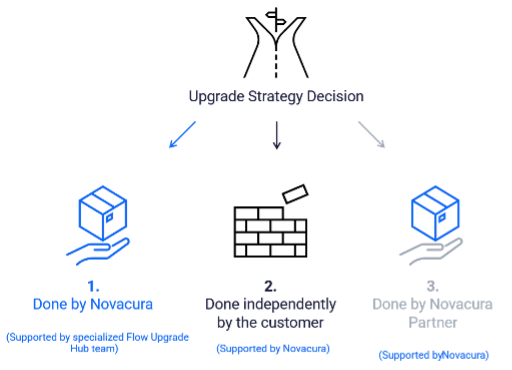
Based on the provided information on the migration complexity, Customers can choose the upgrade approach that best fits their needs and internal capabilities. Novacura offers two primary strategies:
- Done by Novacura, supported by specialized Flow Upgrade Hub Team
- Done by the Customer (DIY), partially supported by Novacura
- Done by Partners, for customers served by Novacura Partners
D. Upgrade project planning [Novacura Consulting] – Optional
Note: This stage is optional – applicable only when the customer chooses the “Upgrade done by Novacura” path.
- Discussion on the technical means the customer should prepare to enable proper communication with Flow Connect
- Finalization of the target solution configuration and architecture:
- Review of the applications subject to the upgrade – determining which applications should be migrated to Flow Connect (including the removal of deprecated workflows and portal pages that still exist in the Classic installation) – performed by the customer.
- Selection of the technical solutions required to address migration challenges (such as introducing services to replace custom connectors).
- Discussion on the scope of work that should be covered by Novacura vs the tasks managed by the Customer (split of work)
- Final upgrade project plan preparation – scope of work for Novacura, schedule, work estimation
E. Signing the Upgrade and SaaS Agreements [Novacura Sales Team]
- To start the migration the customer must sign a separate Flow Connect SaaS agreement, that will grant the customer access to Novacura Flow Connect environment hosted by Novacura.
- Additionally, the customer and Novacura sign a Flow Connect upgrade agreement that confirms the final scope of work and the planned migration schedule. By signing this agreement, both parties confirm the “migration window” during which the customer, with Novacura’s support, will be responsible for carrying out and completing the migration.
- Novacura guarantees access to the Flow Connect environment (running in parallel with the existing Flow Classic environment) throughout the agreed migration window.
4.1. Upgrade Done by Novacura, supported by specialized Flow Upgrade Hub Team
In this approach, most of the upgrade work is done by Novacura. This type of project always involves our customer-facing Consulting team, that nominates a dedicated Project Manager to plan and coordinate the project. The Consulting team takes the responsibility for the result (functional correctness of the solution in the agreed scope) but is largely supported by the specialized Novacura Flow Upgrade Hub Team, focusing on technical aspects of the migration.
Below we present the overall migration path.
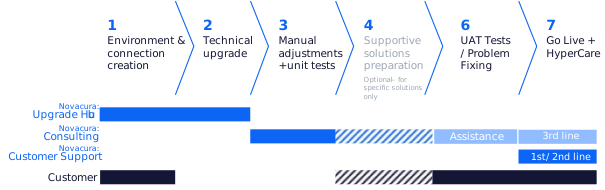
The responsibility and scope of upgrade stages is described in the chapters below, where we use the following abbreviations: NCC – Novacura Consulting, NCUH – Novacura Upgrade Hub, NCS – Novacura Support, CUST – Customer.
1. Environment creation & connection establishing
- NCUH – Creation of Organization for the Customer.
- NCUH – Creation of administrator accounts (they can then independently invite other users to the organization)
- NCUH – Creation of the default Dev / Test / Prod environments.
- CUST – Preparation of the environment to host the connection agents
- CUST – Installation agents / agent managers (supported by NCC)
- NCC – Generation tokens and setting up the basic connectivity.
- CUST, NCC – testing of the network connectivity with customer’s environments (local / other Saas accounts).
Note: From this moment, the Customer uses 2 Flow “installations” in parallel. The Customer can use both Flow Versions in parallel during the migration period defined in the Upgrade Agreement.
2. Technical upgrade [Upgrade Hub Team]
- NCC, NCUH – Preliminary configuration of Connectors (based on provided connectors configuration from Flow Classic)
- NCUH – Import of Workflows and Portal pages from the reference environment passed by the Customer
- NCUH – Technical adjustments to imported workflows (in areas such as user authentication and resolving issues related to converted low-code ERP connector steps migrated to the new REST connector using Flow Script modules) – elimination of the compile-time errors manageable by the Upgrade Hub team
- NCUH – Optional: Conversion of Portal solution, incl. the replacement for direct SQL queries embedded in portlets configuration by adequate workflows responsible for serving the same type of information
- NCUH – Optional: Deployment of Flow Script modules required as shared libraries for running migrated workflow steps
3. Manual adjustments + unit tests
- CUST – Organization of test environments for the business systems that the Flow solution must integrate with
- NCC – Manual review of all preliminarily migrated workflow, implementation of changes needed to eliminate errors / optimization of sub-optimal workflow elements that may cause performance issues
- NCC – Implementation of workflow changes required to use connectors other than those available in Flow Connect (eg. NiceLabel connector replacement)
- NCC – internal runtime tests against external systems (test environments) organized by the Customer – verification of the functional correctness / performance and implementation of the improvements
- CUST – Optional: Redesigning apps not included in the Novacura scope
- CUST – Configuration of the new user roles, app packages and user permissions
- CUST – Correction of the translation Phrasebook (if needed)
4. Supportive solutions preparation
This tasks is optional and can be done by Novacura (NCC) or the Customer (CUST). This is only applicable when the customer uses custom connectors in Flow Classic. These connectors must be reimplemented in the form of the REST services available for Flow Connect.
5. UAT Tests
- CUST – Final UAT Tests on Customers’ environments (covering 3rd party solutions – such as ERP)
- NCC – Quick reaction to the problems identified by the customer
- Consultancy on the identified problems
- Preparation of the solutions to the confirmed problems (within the scope covered by Novacura in the upgrade project)
6. GoLive & Hyper Care
Preparation to GoLive:
- CUST – final approval of the migrated Flow Solution – Go/Not Go decision
- CUST – Internal Change management:
- Communication about the upcoming changes to the affected users / stakeholders
- delivery of the training sessions to the end users if needed
- updating the SOP (standard operational procedures) – If needed
- CUST – Configuration of the users in the new system (the customer must send invitations and make sure users have logged in)
- NCC – Optional: onsite support during GoLive days
After GoLive:
- CUST – First-line on-site support for the end users during HyperCare period
- NCC – Consultancy on the problems, delivery of the solutions
NCS – Fast response to the identified incidents, registration of all the issues in JSM (Jira Support Management) Customer Portal
Remark: keep in mind, that the scope of the service presented above is a general template embracing the most typical (yet complete) scope of tasks Novacura is willing to provide; particular scope of services and the range of Novacura’s responsibilities in a specific customer project may be limited, depending on the customer’s preferences or specific organizational / technical limitations. A factual scope of work (and split of tasks between Novacura and the Customer) must always be confirmed in the individual Upgrade contract.
4.2. UPGRADE DONE BY THE CUSTOMER (DIY), PARTIALLY SUPPORTED BY NOVACURA
In this path, the overall process of upgrading Flow to Flow Connect remains the same, but most of the tasks are covered by the Customer. The diagram below presents the Customer’s responsibility for particular migration stages.
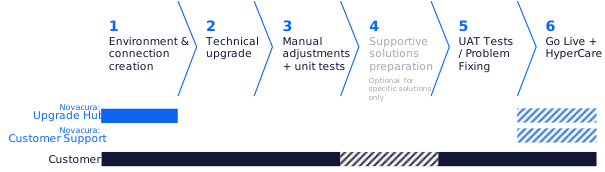
Phase 1 remains the same as in the path done by Novacura, with the following exceptions:
- Novacura offers migration instructions
- Novacura may optionally offer Flow Connect migration training
Phases 2, 3, 4, and 5 – are fully done by the Customer (Novacura may offer paid consultations).
In the Phase 6, Novacura’s support is limited to the Flow platform support (not solution related) – and this support may optionally be delivered in the HyperCare mode.