Safeguarding Your Migration Investment

Novacura supports customers across the full ERP lifecycle – ERP orientation isn’t a marketing tagline, it’s our core mission. So when many of our customers began navigating the upgrade to IFS Cloud, we saw the same friction point emerge: the ERP upgrade itself isn’t the hardest part. It’s what happens to the Flow solutions built around it.

IFS Applications and IFS Cloud don’t just differ in version — they differ in kind. One relies on classic Oracle PL/SQL APIs; the other is a modern cloud platform built on OData and REST. Bridging that gap demands specialized knowledge most teams simply don’t have on hand.

That’s why we built the IFS Migration Tool for Flow. It automates the conversion of Flow applications built for IFS Applications, carrying your business logic forward into IFS Cloud with speed, transparency, and measurable cost savings – typically cutting migration effort by more than 50%.

The tool processes workflows from both Flow Classic and Flow Connect, focusing specifically on the machine steps responsible for IFS interaction and converting them automatically. The heavy lifting is done. Final assembly remains with your development team.

This is not an ERP data migration tool. It protects the Novacura Flow investment your organization has built over the years – and ensures it carries forward into IFS Cloud, not into a rewrite backlog.
Our Solution: Ifs Migration Tool For Flow

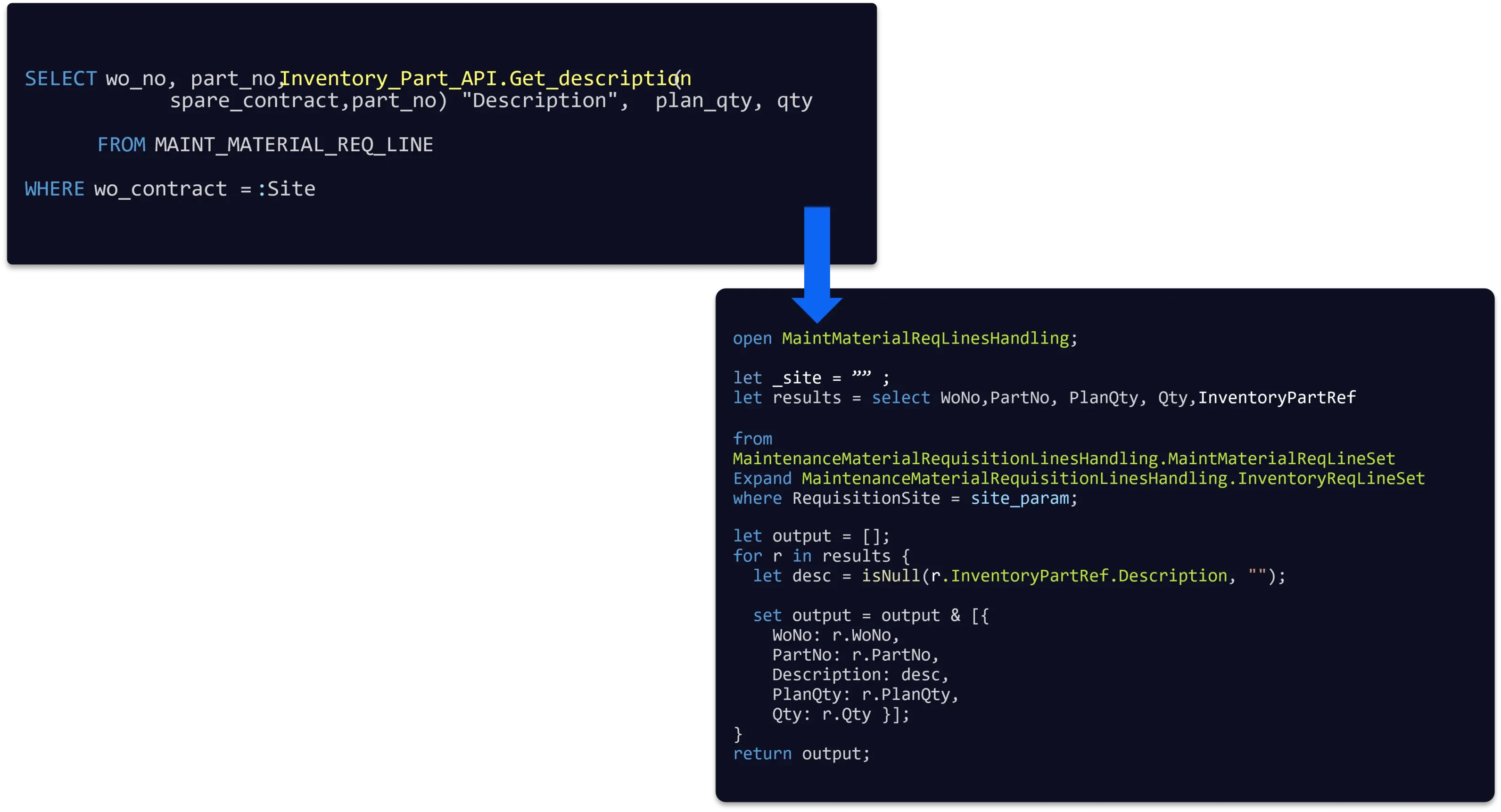
The Migration Tool can process workflows from both Flow Classic and Flow Connect, but the output is always generated for Flow Connect. The tool focuses only on machine steps responsible for IFS Apps interaction and converts them (SQL or PL/SQL blocks) into corresponding Flow Script blocks for IFS Cloud (1:1). In the generated Flow Script, the tool fully utilizes Flow Script Modules generated to wrap IFS API endpoints (Flow Script does not call OData endpoints directly, but only through the available FS Modules). 

While the tool provides significant relief by automating the conversion of logic, it is currently machine-step-oriented. It retrieves and converts the steps, but does not inject the code back into the final workflow automatically; this final assembly remains in the hands of the developer. Furthermore, while the tool can process legacy Flow Classic workflows, the output is always generated for Flow Connect, aligning your environment with the latest technical standards. 

Graphic showing SQL code being transformed into modern workflow scripting, with an arrow pointing from a legacy database query to converted Flow-based code, illustrating automated code migration and modernization.

Note: This tool focuses exclusively on converting workflows between the two IFS product lines. It does not perform the ERP data migration itself, nor does it support a generic “Classic to Connect” migration outside of the IFS version context. 

Who is this for?

This specialized tool is engineered for Novacura Flow users who have developed a robust ecosystem of applications for IFS Applications and now face the strategic necessity of aligning those assets with the IFS Cloud environment. It is built specifically for organizations that recognize the profound technical leap required to move from legacy Oracle PL/SQL APIs to the modern OData projection catalog, ensuring that existing business logic is not abandoned, but rather seamlessly transitioned into the new cloud-native architecture. 

Precision At Scale (The 10-level Complexity Scale)

We do not view migration as a “black box” process. To provide total transparency, the tool classifies every workflow step into 10 complexity levels: 

  • Levels 1–3 (The Core): These represent the vast majority of daily tasks – simple queries and single write actions. Here, the tool achieves 95–100% effectiveness. These steps are typically production-ready the moment the tool finishes. 
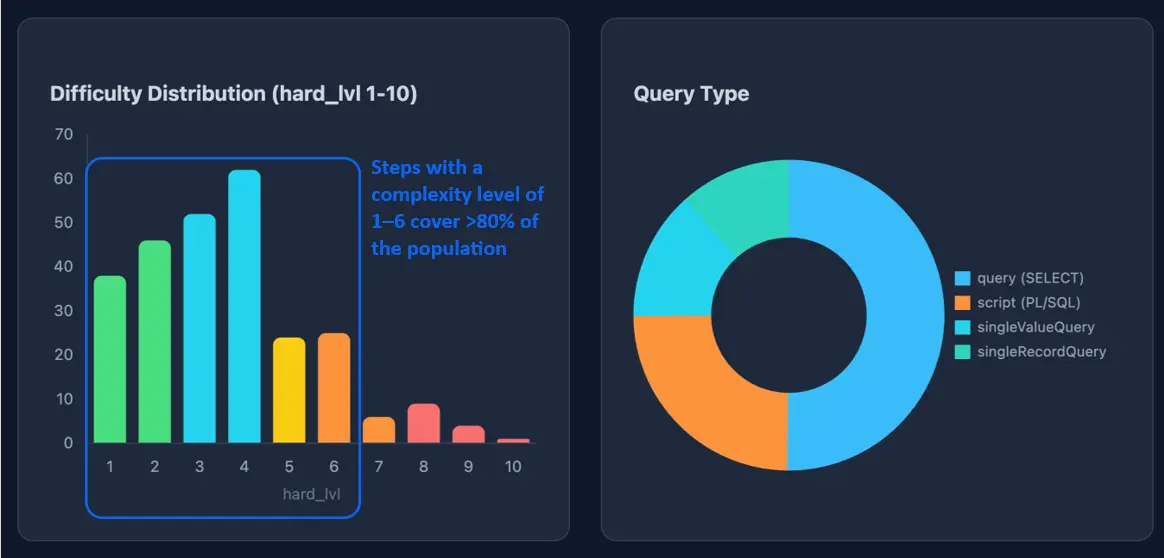
  • Levels 1–6 (The Bulk): These represent 80–90% of all workflow steps in a typical project. By automating this massive volume, we effectively eliminate the “hundreds of hours” of manual work that usually bloat migration budgets. 
  • Levels 7–10 (The Outliers): Even for complex “mini-programs,” the tool provides a significant head start, marking exactly where a human developer needs to provide the finishing touch. 

A critical differentiator is our Semantic Judge and False Positive Prevention. Rather than guessing, the tool is designed to be skeptical. If there is any doubt about the technical integrity of a conversion, the system will flag an ERROR or Partially OK status rather than risking a system crash during go-live.

Dashboard graphic with a bar chart showing query complexity distribution levels and a donut chart categorizing query types, illustrating that most migration steps fall within low-to-medium complexity ranges.

Note: the distribution of complexity is not equal – usually levels 1-6 cover 80-90% of the workflow steps.

TRADITIONAL APPROACH 

WITH NOVACURA FLOW AI TOOL 

Budget estimate based on gut feel – revisions common mid-project 

Pre-migration complexity report before a single line of code is written 

Every custom step translated manually by consultants 

80–90% of steps are converted automatically; developers are involved only in verification and resolving the remaining genuine edge cases

Months of parallel running, testing, rework 

Most of steps of the complexity levels 1–3 are production-ready the moment the tool finishes 

A successful transition demands deep technical mastery of the extensive IFS Cloud projection catalog and its vast array of API endpoints. 

It eliminates the necessity for exhaustive, deep-level expertise in the new IFS Cloud API landscape. 

Traditional migration vs. AI-assisted migration 

What The Tool Delivers: Three Actionable Outputs

The IFS Migration Tool for Flow doesn’t just run a conversion – it produces three distinct outputs, each serving a different stage of your project. 

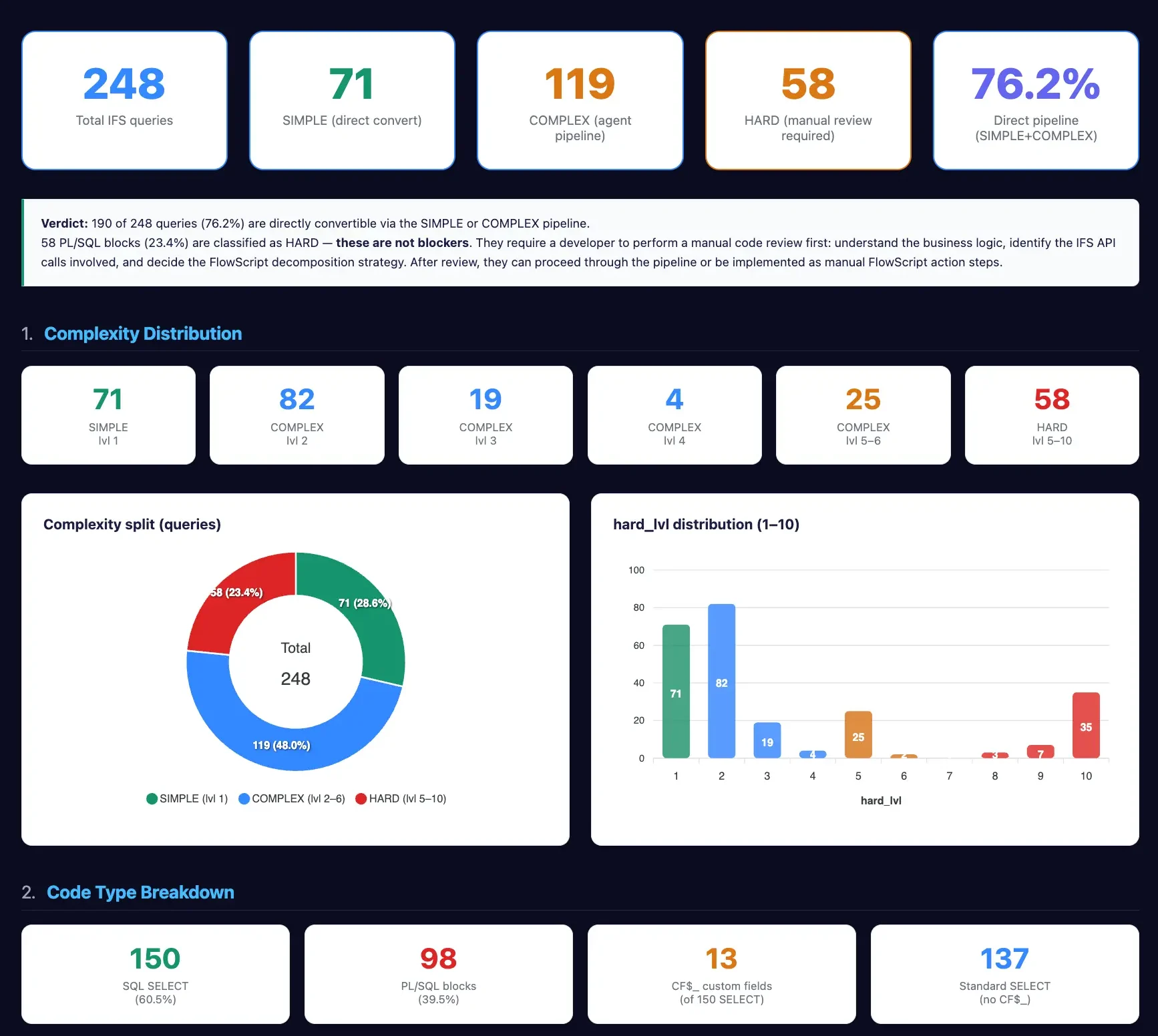
The Pre-migration Complexity Evaluation Report comes first, before a single line of code is   touched. It maps the full scope of your workflows, classifies every machine step by complexity level, and gives you a data-driven foundation for your budget and timeline — replacing gut-feel estimates with a boardroom-ready business case. 

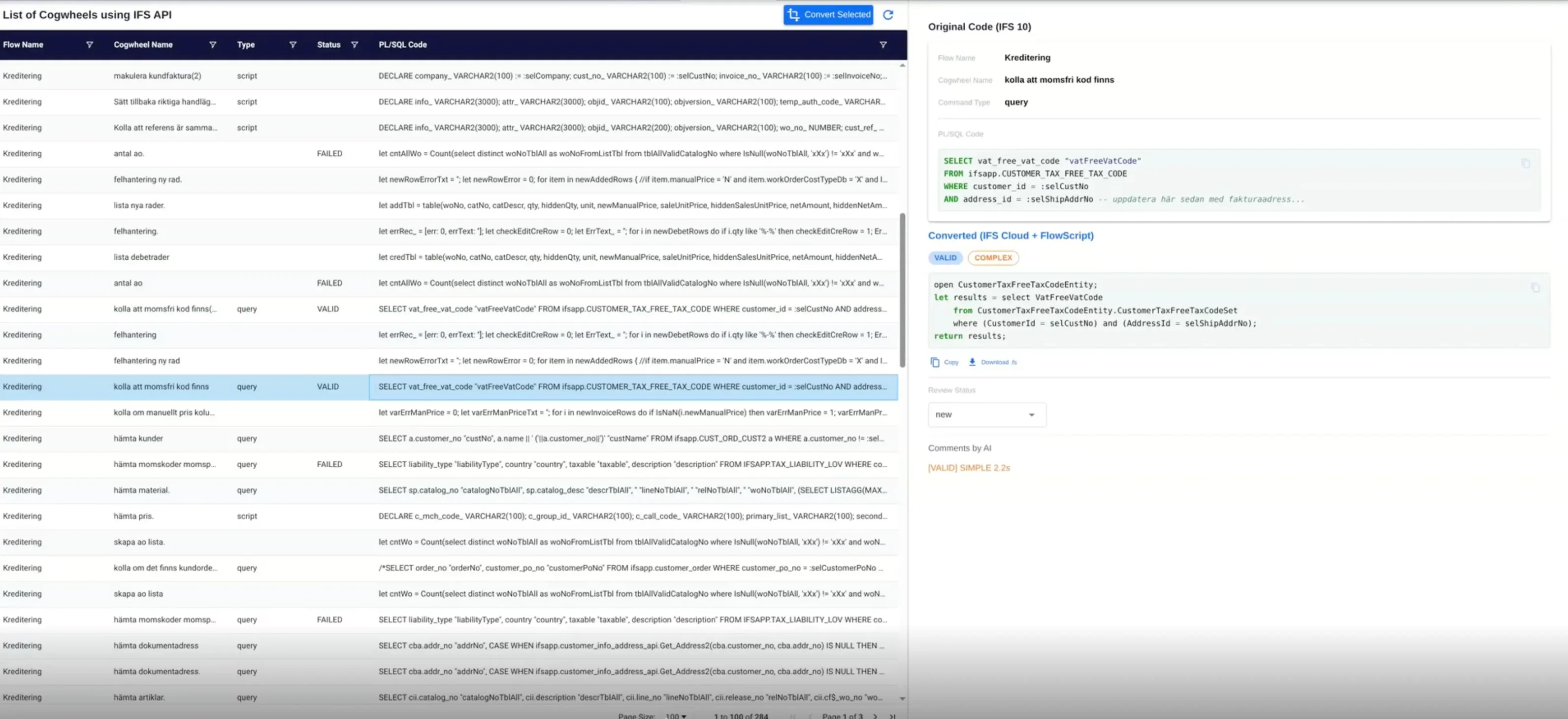
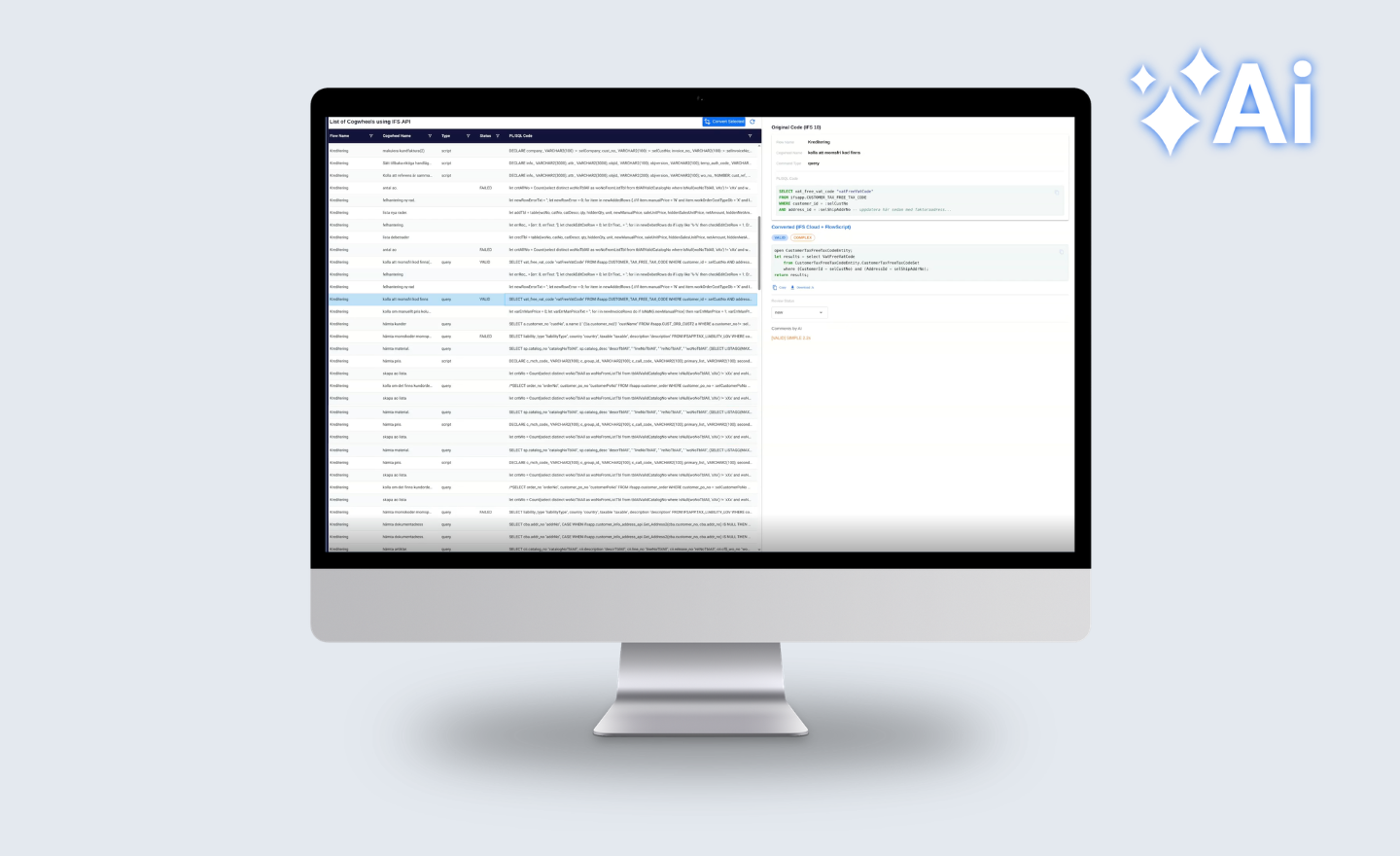
The Actual Migration Results are delivered as a structured table for each workflow step, showing the original SQL or PL/SQL alongside the converted Flow Script, the complexity level assigned, the migration status (fully converted, partially done, or flagged for review), and any warnings or suggested corrections. This is the working output your developers act on directly.

A side-by-side comparison interface of a code conversion tool. The left pane shows a "List of Cogwheels using IFS API" with various script statuses (VALID, FAILED). The right pane displays a specific transformation: "Original Code (IFS 10)" using standard SQL being converted into "Converted (IFS Cloud + FlowScript)" using a modernized, entity-based syntax.

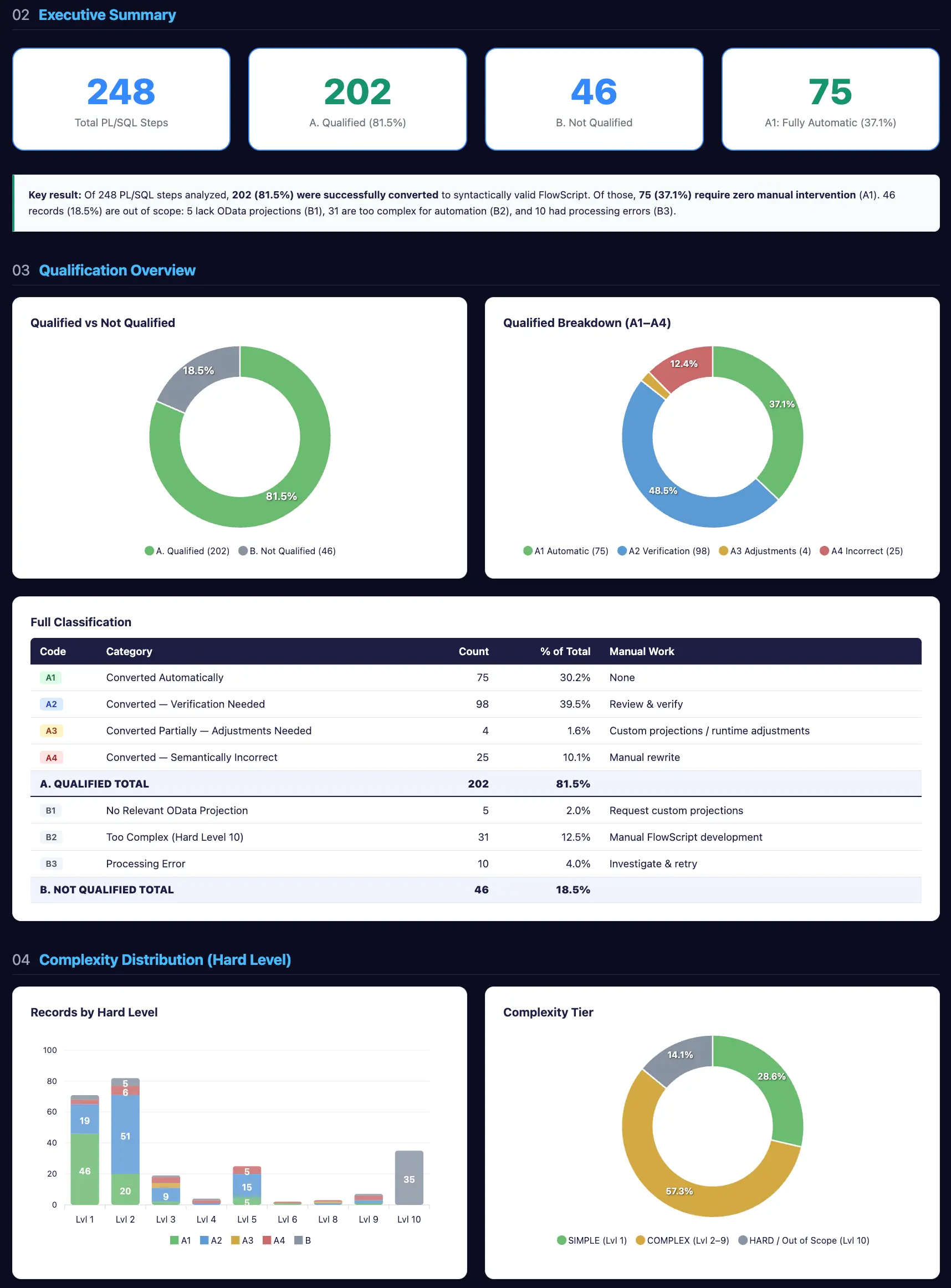
Finally, the Migration Results Report summarizes the entire migration run — accuracy achieved per complexity tier, distribution of step types, and a clear signal of which areas require manual developer attention. It’s designed to be shared upward, giving stakeholders a transparent view of what was automated and what remains.

Executive Summary dashboard showing conversion results for 248 PL/SQL steps. A key result highlights that 202 steps (81.5%) were successfully qualified, with 75 steps being fully automatic. The report includes donut charts for qualification breakdowns and a detailed table classifying steps by the amount of manual work required, from "Converted Automatically" to "Manual Rewrite."

Together, these three outputs turn migration from an opaque, anxiety-inducing process into a measurable, reportable project.

The Architecture: Domain-Specific AI

The AI layer in this tool is not a generic language model; it is the core technical architecture, trained specifically on IFS-domain expertise. 

The system utilizes a multi-module approach where the majority of operations are deterministic – meaning they use strict rules to map IFS Apps tables and methods to their OData projection counterparts with 100% repeatability. This is combined with a Flow Script parser (the same used in our Flow Designer) to validate syntax in a continuous loop until errors are eliminated. 

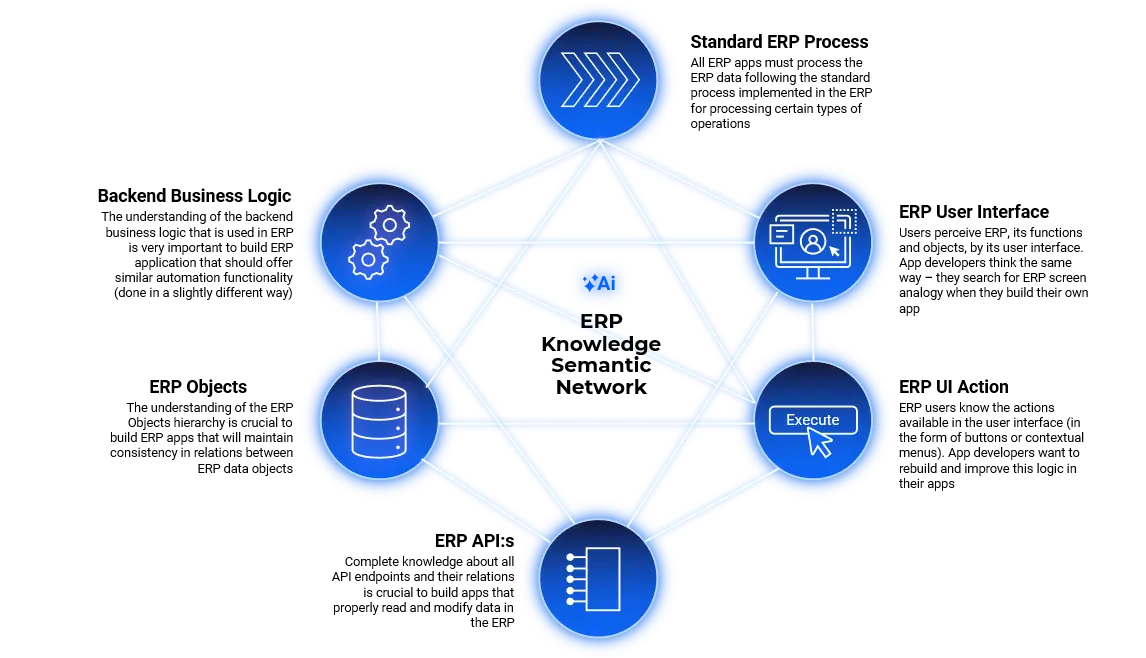
A glowing blue infographic on a black background showing a hexagonal network of interconnected icons. The nodes represent data storage, gears (logic/processing), user interface, code execution, and connectivity. At the center of the web is a small "Ai" sparkle icon, symbolizing an AI-integrated ecosystem or semantic model.

Strategic Implementation: How To Use The Migration Tool In Your Journey

Navigating the leap to IFS Cloud does not require a “one-size-fits-all” approach. Whether you seek a turnkey transformation or wish to leverage your internal technical talent, we provide a structured path to bridge the gap between legacy IFS Applications and modern cloud architecture. 

Path A: Full-Scale Migration Managed by Novacura 

For organizations prioritizing speed and risk mitigation, Novacura delivers a comprehensive, end-to-end migration project. 

  • Curation of Logic: You provide your current workflows, excluding obsolete or redundant processes to ensure a clean migration scope. 
  • Automated Conversion: Our experts utilize the IFS Migration Tool for Flow to generate converted Flow Script code, complete with automated statuses and migration reports. 
  • Expert Verification: Novacura consultants perform a deep-level review, estimating the remaining manual adjustments required for complex cases and finalizing the solution for UAT. 
  • Predictable Commercials: We offer a competitive proposal that balances the value of automated hours saved against the overall project TCO, ensuring the migration remains a strategic gain rather than a financial burden. 

Path B: The “DIY” Model – Support for Internal Teams 

If your team prefers to handle final implementation, Novacura provides the automated intelligence needed to jumpstart the process. 

  • Data-Driven Outputs: We process your workflows through our tool and deliver high-value migration results in Excel, including “before-and-after” code comparisons and detailed comments. 
  • Accuracy Classification: Our Tool Experts classify the results into “Fully Automated,” “Partially Automated (with minor adjustments),” and “Manual Reference,” providing your team with a clear starting point. 
  • Consultative Support: After delivery, Novacura remains available for technical workshops and clarification sessions to resolve any difficult migration edge-cases your team encounters. 

Your First Step: The Migration Suitability Assessment

You don’t have to guess the complexity of your migration. We have simplified the entry point to ensure you have full visibility before committing to a path.

  1. Share Your Flow Ecosystem: Contact your Account Manager to securely provide the workflows you intend to migrate.
  2. Receive an Initial Evaluation: Our Tool Experts will generate a Pre-migration Complexity Evaluation Report.
  3. Data-Backed Decision Making: This report serves as your baseline, identifying the suitability of your current solutions for automated migration and providing an early look at potential project friction. 

Ready to see how much of your legacy logic can be automated? Contact us today to submit your workflows for a preliminary assessment. 

Łukasz Majer

Business Solutions Director at Novacura