 November 24, 2012
 13 min to read
IFS Applications 10 will not stop working on a given morning. But 2027 is the last year in which you can plan the move to IFS Cloud calmly – with the budget, the team and the partner capacity you want. This article explains why, what the upgrade changes in daily operations, and what we have learned from upgrading customers such as Nordic Paper.
In short
- Standard support for IFS Applications 10 ended in March 2025. Extended Support – narrower in scope and with extra fees – ends on 27 March 2028.
- Most upgrades take 6–12 months, so a project that must finish before that date has to start in 2027 at the latest.
- An upgrade is won or lost less on technology than on modifications, integrations, testing and people. That is where an experienced partner makes the difference.
Why 2027 is the LAST year to start
Nothing happens on a particular morning. Standard support for IFS Applications 10 ended in March 2025. Extended Support continues, but with a narrower scope and extra fees, and it ends on 27 March 2028. That is a date to plan around, not a reason to worry.
The planning is where 2027 comes in. Most upgrades take 6–12 months. A 12-month project that must be finished before 27 March 2028 therefore has to start by March 2027, and even a six-month project has to start by September 2027. Before kick-off, some things need time too: an assessment of your modifications and integrations, a budget decision, a licensing and deployment choice, and a team that is released from daily work.
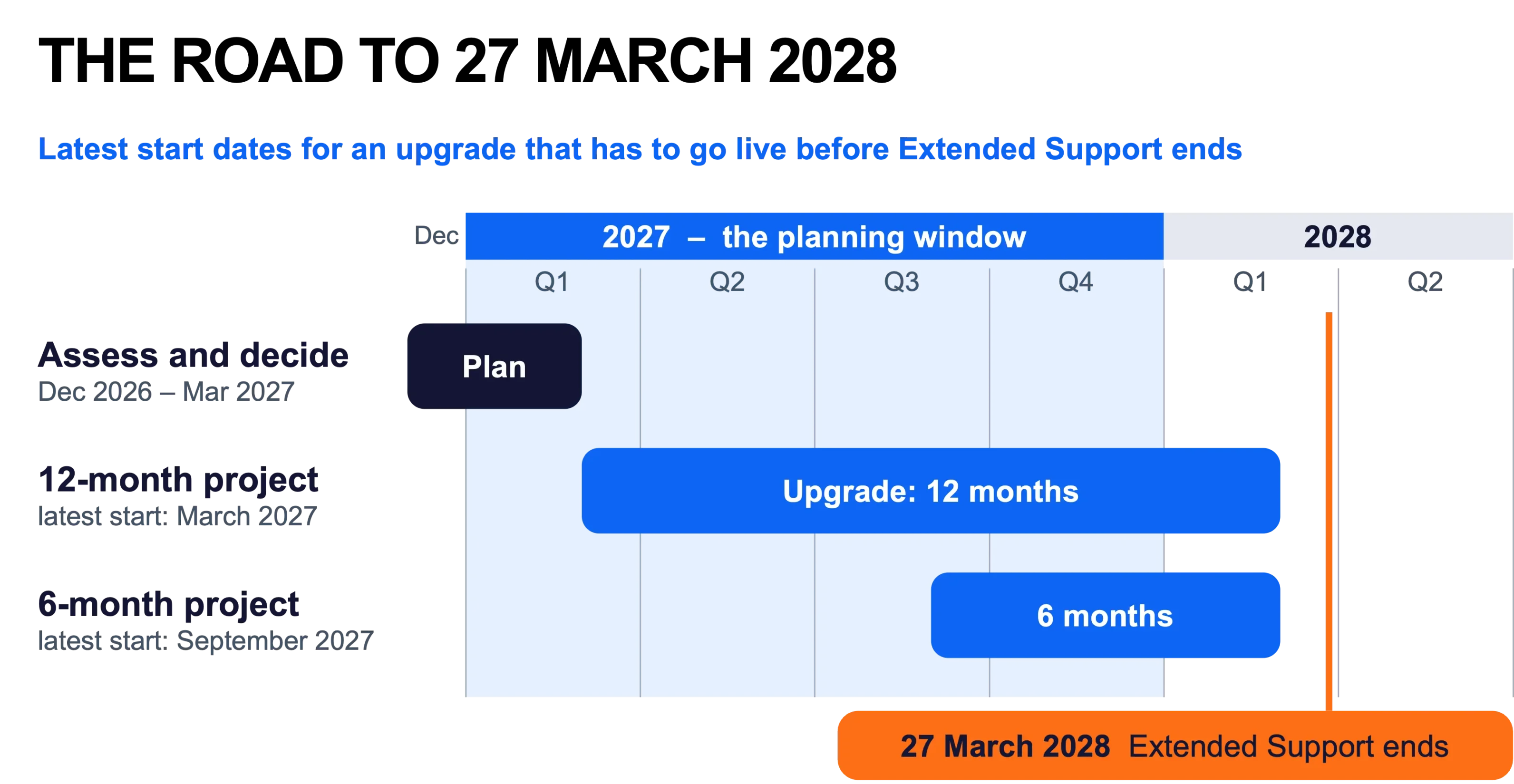
Most IFS upgrades take 6–12 months. Dates show the latest start that still finishes before the deadline, with no buffer for testing or delays. Standard support for Applications 10 ended in March 2025.
The second reason is capacity, and it is about people rather than IFS. Every IFS Applications 10 customer is working towards the same date, and other large ERP deadlines fall in the same window – SAP ECC, for example, reaches the end of mainstream maintenance on 31 December 2027. We cannot put a number on it, but it is reasonable to expect that experienced upgrade consultants, and your own key users and testers, will be harder to book the closer the deadline gets. Planning early is the simplest way to secure the capacity you want.
The good news is that 2027 is not too late. If you start planning in the first half of the year, you still have room for a proper assessment, careful decisions about what to keep, and a test cycle you do not have to rush. Wait until the autumn and you will be making the same decisions with far less choice.
What the upgrade does for your business
An upgrade to IFS Cloud is often presented as a technical project. The business case is stronger when you look at what changes for the people running the operation. Four effects are worth planning for:
- Planned change instead of big-bang upgrades. IFS Cloud ships two releases a year – the “Evergreen” model. With a clean core, updates are smaller and predictable. With a heavy modification footprint, one developer may need 1–4 weeks per release to merge code before testing even starts. The upgrade decides which of the two you get.
- An interface where people work. IFS Cloud runs in the browser, with a responsive interface on desktop, tablet and mobile, and regular security updates.
- Lower long-term cost. Every modification you keep is a cost you pay again at each release. The upgrade is the moment to decide which to keep, which to replace with standard IFS, and which to move outside the core.
- A foundation for AI. IFS AI is built for IFS Cloud. The upgrade is your chance to clean master data and standardise processes – the groundwork any AI use case depends on.
What it looks like in practice
Manufacturing: warehouse and shop floor. A plant has years of custom logic for picking, labelling and goods receipt built into Applications 10. During the upgrade, each modification is compared with what IFS Cloud now does as standard. Many can be retired, which means fewer things to re-test at every release. The few that remain are rebuilt outside the core. For warehouse staff, the same process now runs in a browser-based interface on tablets and mobile devices. For IT, the warehouse no longer stands in the way of release updates.
Logistics and distribution: integrations. Carriers, 3PL partners, web shops and EDI links have been connected to IFS over the years, often point-to-point and often through PL/SQL. IFS Cloud moves integration to OData/REST and does not allow direct database access. The upgrade is the moment to inventory every integration, decide which ones survive, and consolidate on one integration layer instead of rebuilding each connection one by one.
Service, maintenance and asset-intensive industries (energy, mining, oil & gas): uptime. Maintenance planners and technicians live in IFS: assets, work orders, spare parts. A browser-based interface and a regular security-update rhythm matter most where uptime does. Nordic Paper, for example, chose IFS Cloud to maximise uptime, strengthen security and strengthen maintenance at its paper mills. A clean, standard core also means planned service updates do not disturb the maintenance processes that keep a plant running.
Why upgrade with Novacura
Choosing an upgrade partner is mostly a question of evidence. Here is ours, followed by the questions we would ask any partner. The details are on our IFS Cloud upgrade services page.
What we can show
- Track record. IFS Channel Partner since 2015, now at Gold Channel Partner level, and IFS Channel Partner of the Year in 2017, 2019 and 2022.
- 150+ IFS projects delivered, including upgrades such as Nordic Paper’s move from IFS Applications 7.5 through Applications 10 to IFS Cloud.
- People and support. 70+ IFS consultants, and Evergreen AMS support with 24/5 coverage and a two-hour fastest response for high-priority cases.
And we cover the whole upgrade, not just the project in the middle:
|
Phase |
What we do |
|
Before |
Upgrade Readiness Assessment (scope, risks, timeline, budget), modification analysis, IFS Cloud licensing in all models under one agreement |
|
During |
Project management, data migration and cleansing, integrations moved to OData/REST, testing, training and change management |
|
After go-live |
Evergreen AMS: help desk and incident handling, release and service update support, optimisation and ERP usage audits |
Data migration, testing, training and change management are normally part of the upgrade scope. How much we do and how much your own team does is agreed project by project.
How we approach modifications
We start with the business process, not with a tool. For every modification we ask three questions, in this order: Can standard IFS Cloud do it? If not, can IFS be configured to do it without touching the core? Only where a real gap remains do we build outside the core. That keeps the core clean and Evergreen releases manageable.
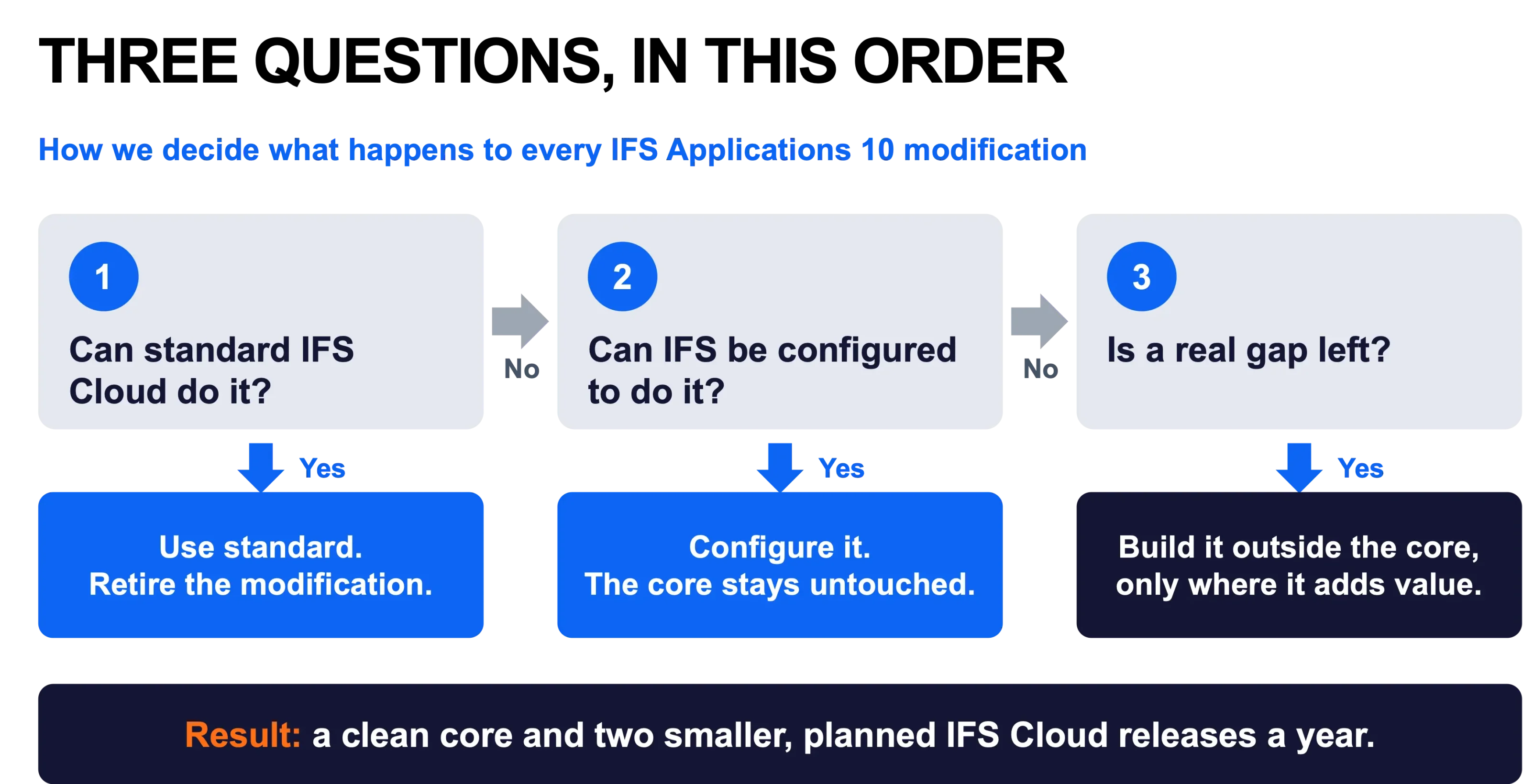
Order of decision used by Novacura in IFS Cloud upgrades.
Where a gap does remain, we sometimes build outside the core with Novacura Flow, our AI-powered platform – only where it adds value. If you already run Flow on IFS Applications, you may qualify for a migration tool that moves your Flow workflows to IFS Cloud 2025 R2 and Flow Connect. Ask us whether your setup is eligible.
Questions to ask any upgrade partner
- How many upgrades to IFS Cloud, not only implementations, have you delivered – and may I speak to one of those customers?
- How will you decide what happens to each of our modifications?
- How do you treat integrations that rely on PL/SQL or direct database access?
- Who is responsible for release updates after go-live, and what exactly does that cover?
- Which licensing and deployment models can you advise on?
- Which parts of the project will your team do, and which do you expect from ours?
Three roles, nine questions
An upgrade decision is rarely made by one person. These are the three roles we meet most often, and the questions each of them asks first.
The CIO or IT Director: “How long do we really have, and what will it cost?”
What happens if we wait until 2028?
Extended Support covers a narrower scope for extra fees and ends on 27 March 2028. With 6–12 months as the typical project length, waiting turns a planned project into a deadline project, with less choice of dates, people and approach.
What will it cost?
Expect four cost areas: licensing, infrastructure, project services and post-go-live support. Customisations are the biggest cost driver. Licensing moves from perpetual to subscription, which also brings the Customer Success Agreement and Test Data Manager into the picture. We will not quote a number without looking at your system – that is what the Upgrade Readiness Assessment is for.
Which deployment model should we choose?
The options are IFS-managed SaaS, customer-managed cloud and, in some cases, private or on-premise set-ups. SaaS gives the fullest Evergreen benefit. Nordic Paper chose IFS Managed Cloud to avoid managing hardware in-house.
The ERP System Owner: “What happens to everything we built?”
What do we do with our modifications?
Decide one by one: standard IFS, configuration, or outside the core. Keep a register of every modification, retire the ones nobody uses, and govern new requests so the footprint does not grow back.
What happens to our integrations?
They move from PL/SQL to OData/REST, and there is no direct database-level access. Audit every integration early, design the APIs deliberately, and connect legacy systems through an integration gateway where needed.
Will Evergreen really be easier?
Only if the customisation footprint has been dealt with during the upgrade. Keep an eye on the roadmap too: Crystal Reports is being deprecated, and IFS plans to deprecate PL/SQL online actions, with no date announced.
The Operations or Process Owner: “What will my people notice?”
What changes for my team?
A browser-based interface on desktop, tablet and mobile. At Nordic Paper, users also got tailored lobbies for their priority workflows, which helps departments see what needs attention.
How do we keep operations running during the project?
Business continuity is one of the principles we apply to every upgrade: testing against real processes, training for different user groups, and change management. On Nordic Paper’s go-live day, only minor questions about the interface and tasks came up.
What do you need from us?
Time from your key users and testers, one person who can decide process questions, and a single test plan across departments. Afterwards, keep reinforcing the new ways of working. Nordic Paper found that without it, people drift back to old habits.
Proof: what a real upgrade looked like at Nordic Paper
Nordic Paper, a Scandinavian producer of kraft and natural greaseproof paper with about 700 employees, upgraded from IFS Applications 7.5 through Applications 10 to IFS Cloud 21R2 between January and November 2022 – one of the first IFS Cloud upgrades in Sweden. About 350 users in finance, procurement, warehouse and maintenance moved to the new system, and all subsidiaries ended up on a single IFS instance. The team chose a direct upgrade to reuse existing licences and keep current data, and IFS Managed Cloud to avoid running hardware in-house. Novacura led the project with a project manager and several solution consultants.
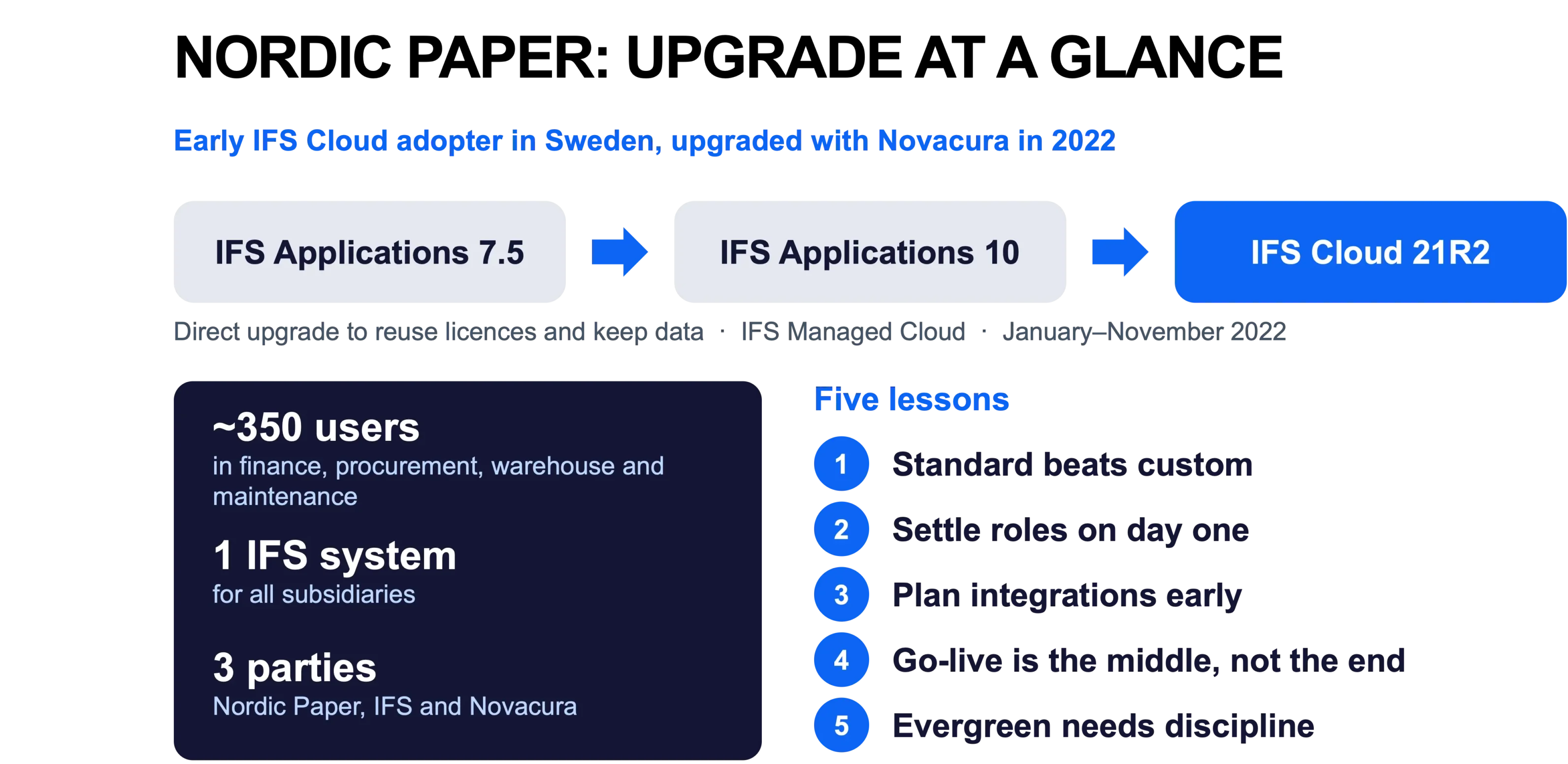
Source: Novacura case study “Nordic Paper’s IFS Cloud upgrade” (2022).
Five insights from the project:
- Standard beats custom. Most customisations were removed in favour of standard IFS functionality, and one of two maintenance systems was phased out. Fewer customisations made discussions about system updates simpler.
- Settle roles on day one. With three parties (Nordic Paper, IFS and Novacura), task assignment caused friction early on. Define who is responsible for what at the start.
- Integration takes longer than planned. Integration through REST OData needed more time than expected, and middleware sizing needed attention. Audit integrations before you plan the timeline.
- Go-live is the middle, not the end. On go-live day only minor questions came up, but people used to the old version found the new interface hard. Training combined Teams sessions, on-site instruction for maintenance and warehouse staff, and how-to videos on the intranet, with basic training for occasional users and deeper training for daily users. Management then kept reinforcing the new workflows so that people did not slip back into old habits.
- Evergreen needs discipline. Once live, the speakers rated overall stability as very good. IFS Cloud ships a release every six months, though, and rolling back after a defect is difficult, so environments have to be managed carefully.
Because this was an early adopter project, the team also met early-version issues, such as cryptic error messages and slow data processing. We include them on purpose: they are part of an honest upgrade story, and part of why the planning, roles and testing above matter.
Read more in the Nordic Paper case study and the recap of Nordic Paper’s IFS Cloud journey.
A realistic plan for 2027
There is no single right schedule, but a sensible sequence looks like this:
- December–January: assess. Run an Upgrade Readiness Assessment: scope, risks, timeline and budget, based on an inventory of your modifications and integrations.
- By the end of Q1: decide. Agree the business case and budget, choose the licensing and deployment model, name a sponsor, and free the key users and testers you will need.
- Kick-off: as early as you can. A 12-month project has to start by March 2027, a six-month project by September 2027. Leave a buffer for testing and for the first release update after go-live.
- Go-live with room to spare. Finish well before Extended Support ends on 27 March 2028, then settle into the Evergreen rhythm of two releases a year.
Six questions to ask yourself before you call anyone
- Business case and timing: Do we know what waiting costs, and does the project have a sponsor and a 2027 budget?
- Scope and modifications: Can we explain why each modification exists, and whether it should be standard, configured or built outside the core?
- Integrations and data: Do we know every integration that must move to OData/REST, and is our master data clean enough to migrate and to use with AI?
- People and testing: Can our key users be freed up, and is there one test plan across departments?
- Running Evergreen: Who will run release updates after go-live, and how will we test them?
- AI readiness: Have we picked our first two or three AI use cases, and is access to data governed?
Wherever the honest answer is “not sure”, that is where the assessment should start.
Start with a readiness assessment
The most useful first step is also the smallest: an IFS Cloud Upgrade Readiness Assessment. We look at your modifications, integrations, licensing and organisation, and give you a scope, the main risks, a realistic timeline and a budget you can take to your management team. You decide afterwards whether, and with whom, to go ahead.
- Book an IFS Cloud Upgrade Assessment to get a scope, the main risks, a timeline and a budget.
- Talk to our IFS expert, Östen Westman: info@novacura.com.
- Follow the IFS Cloud Upgrade webinar series (five episodes): why upgrade, upgrade strategy options, technical challenges, organisational challenges and planning the project.
Already run Novacura Flow on IFS Applications? Ask whether your setup qualifies for the migration tool.