 June 15, 2021
  3 min to read
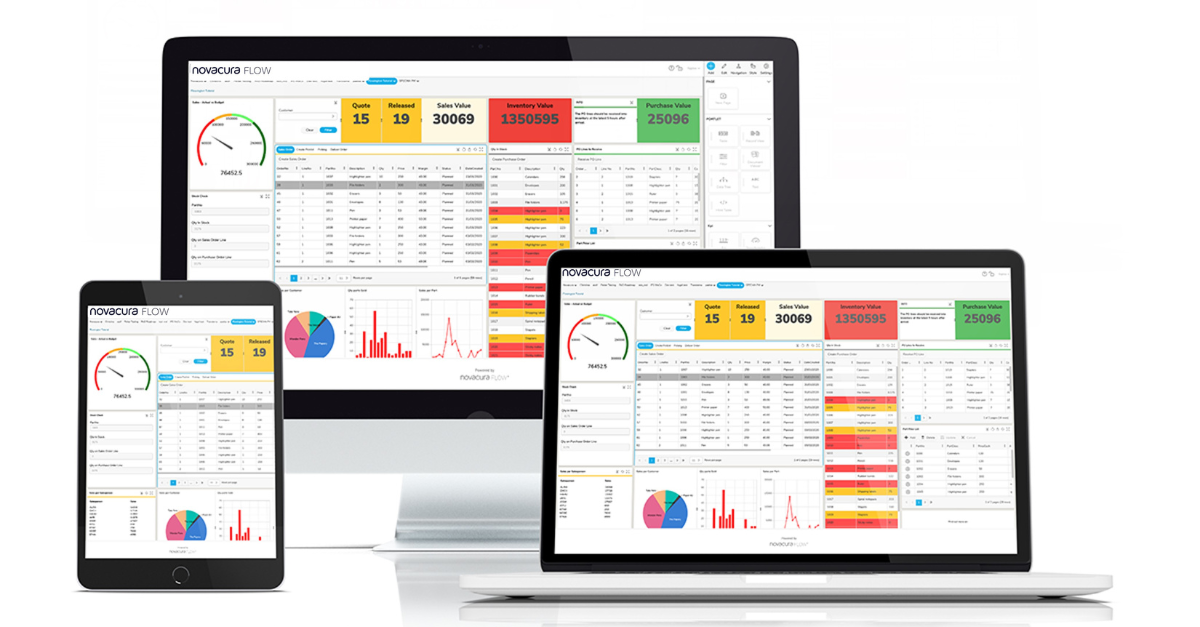
 As you see there are several parts of Novacura Flow but right now we would like to focus on the above-mentioned game-changer, Flow Portal.
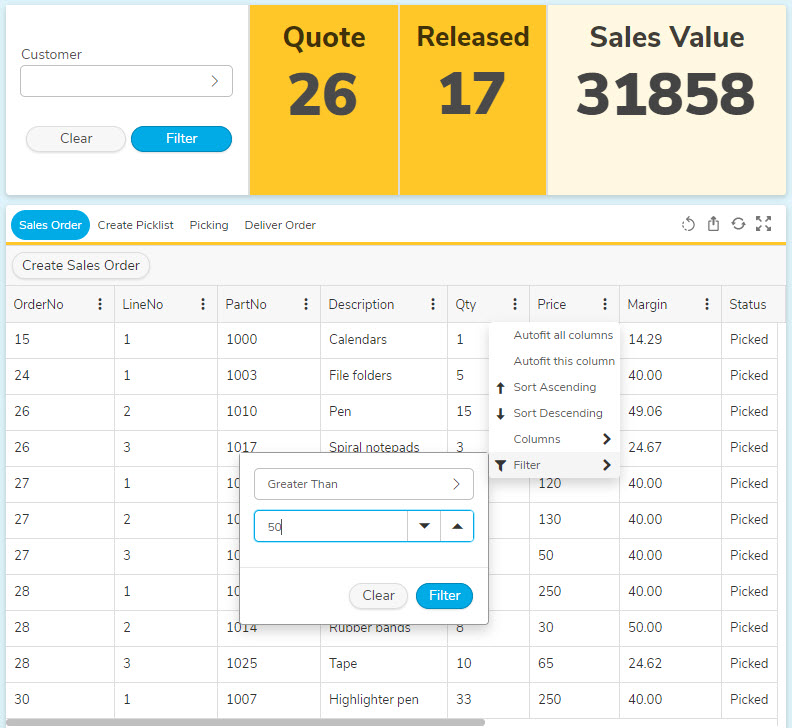
This part of the platform adds an extra dimension to Novacura Flow where you can control your entire business—data, workflows, processes, dashboards, reports and more. Flow Portal is where all your data comes together. Use the portal to visualize and monitor your KPIs, improve your processes and stay on top of everything.
As soon as you get the overview, it’s easier to see where the potential of reaching your business goal is. Identifying where you can make minor changes can really make a difference.
Related articles
:

Usability is becoming the defining factor in ERP efficiency. In this interview, Aksel Jarlbäck explains how Novacura is transforming the Infor M3 experience by making business applications intuitive, user‑friendly, and adaptable.
On December 5th, 2025, Novacura hosted its Q4 Quarterly News webinar to wrap up a year of significant transformation for the Novacura Flow Platform. This session provided users with a transparent view of the final 2025 updates, focusing on flow connect stability, AI-powered automation and the official launch of the new Marketplace Belów, we break down the main themes covered during the Q4 webinar, highlighting, how we’ve turned the promises of earlier quarters into reality, and what new key features our users can expect in 2026. Q4 Product release: Powering the Future with AI-driven insights and a new Marketplace experience Closing the year with a major leap forward, our Q4 update positions Flow Connect as a modern environment, delivering enhanced automation and an improved user experience: Seamless Offline and Async OperationsBuilding on the “Async” capabilities introduced the past, the Q4 update finalizes the offline client capabilities. The demo showcased a sophisticated logistics scenario where data preloading and background synchronization now happen with zero latency for the end-user. This ensures that Novacura Flow Connect is the premier choice for low-connectivity environments like remote sites or deep-storage warehouses. New Map PortletThe Map Portlet has been officially introduced to the Portal. This allows for advanced geographic data visualization directly within Custom Content Portals. Users can now view real-time asset locations or service routes on interactive maps and take action directly from the dashboard. Phrasebook: Centralized Translation ManagementThe Translation Management System (Phrasebook) is now fully operational Supporting ICU formatting, this feature allows developers to translate a statement once and reference it across all applications. This eliminates the need to translate the same phrase multiple times, ensuring a consistent, multilingual user experience globally. Marketplace: the new Platform is LIVE! The most anticipated update of Q4 was the official transition to the new Novacura Marketplace Platform: The Public Portal Features significantly better filtering by ERP system, a clear distinction between “Examples” and “Full Application Packages”. One Click Enabling The Transactional Part of the marketplace now allows for “one-click” app activation, deploying solutions directly into the environment. AI Powered Search Users can now find relevant applications among over 200 listings using natural language prompts (e.g., “Show me apps for mobile maintenance in IFS Cloud”). New Strategic Packages We officially released the Supplier Invoice Automation and Time Reporting for Regular Employees packages. The AI frontier: Flow Connect Co-Pilot The AI-Powered Flow Connect Co-Pilot is now available to help users with development questions through real-time chat. Whether you need help writing a specific Flow Script or understanding an error message, the Co-Pilot acts as an expert assistant built directly into the Workflow Designer, making onboarding to Flow Connect faster than ever. Automation: Intelligence at scale Novacura continues to streamline workflow modernization and migration capabilities: AI-Driven Automation Insights The Automation Analytics Dashboard introduced in Q2 has evolved. It now features the Data Analysis AI Copilot, which provides automated summaries of server-side runs. Instead of just monitoring success or failure, the AI now identifies performance trends and suggests optimizations for individual workflow steps. Security and ProvisioningTo support large-scale enterprise deployments, we have introduces […]
On June 27th, 2025, Novacura hosted its Q2 Quarterly News webinar to share the latest product updates, feature enhancements, and future plans for the Novacura Flow Platform. This session provided users with a transparent view of ongoing development efforts, focusing on improvements to offline functionality, automation capabilities, migration tools, marketplace innovations, and upcoming AI-powered features. Below, we break down the main themes covered during the webinar, highlighting what users can expect now and in the coming quarters. Q2 Product Release Highlights: Enhancing User Experience and Functionality The Q2 release brought numerous improvements aimed at expanding both Flow Connect and Flow Classic environments: Offline Portal and Client EnhancementsBuilding on Q1’s offline data preloading, Q2 introduces the second portion of offline client capabilities – Async. With these two features combined, Novacura Flow Connect can now support seamless operations in low-connectivity environments like warehouses. The demo showcased an inventory management workflow, illustrating real-time stock monitoring and offline task assignments synced later.Portal Enhancements Portal added Interactions with the Custom Content Portal. These new interactions provide a new way of interacting with Portlets. Now, you can navigate seamlessly between Portal pages, external pages, or even start apps directly from the Custom Content Portlet. In the demo, Novacura showcased how this feature could be used for inventory management across multiple warehouse locations to present visually appealing dashboards that you can take action on. Advanced File System Integration The FileSystem connector has been introduced in Flow Connect. The new file system connector allows read and write capabilities to local or external file directories. In the demo, Novacura illustrated dynamic importing of CSV data, managing unexpected file structure changes by handling additional columns automatically. This new connector now means support for customers who use FileSystem connector on Flow Classic. Workflow Designer and Sync Improvements Upcoming visual updates to the Designer will clearly separate interactive user steps from async processes, enhancing clarity in offline sync workflows, especially for users transitioning between Classic and Connect. Translation Management System Future releases will introduce centralized translation storage supporting ICU formatting. This feature aims to simplify localization and ensure consistent multilingual user experiences. Gone are the days of translating the same phrase multiple times within different workflows. Now, with the Phrasebook, you can translate a statement once and reference it in all of your applications. Migration and Automation: Streamlining Workflow Modernization and Analytics Key advancements were announced for automation and migration capabilities: Import Wizard for OData Workflow Migration The new wizard simplifies converting Classic IFS OData workflows to Novacura Flow Connect Apps, using Flow Script OData modules compatible with IFS Cloud. This new feature automates connector mapping, module creation, and error identification during the import process, making modernization more accessible without rewriting workflows from scratch. Automation Analytics Dashboard A newly introduced dashboard tracks server-side Automation runs, monitoring triggers, success or failures, and detailed step-level performance. This visibility helps developers optimize automation health and troubleshoot issues promptly. Connector and Security Updates Improvements to the Connector Agent include faster token caching and expanded REST connector scripting. Additionally, new FileSystem connector operations support UNC paths and binary […]
We’ve built a Marketplace to give you direct access to some of our most requested apps. Get even more value from your Novacura Flow purchase with ready-to-use apps for IFS that provide you with innovative insights and speed up solution-to-delivery time. With a low-cost subscription starting at just $1,500 a month, you can gain access to the entire subscription library. That’s a growing list of over 50 apps for IFS geared towards HR, Service, Maintenance and Warehouse Management. Once subscribed, you can download the apps directly from the Marketplace, import them into your Novacura Flow studio environment and customize them as you’d like. It’s an entirely new way to experience Novacura Flow and we’d love for you to give it a try! We’ll even give you a 30% discount on your subscription if you sign up by July 30th.* The Novacura Flow beta client is only available on Android, iOS is coming soon. Here’s a sneak peek at some of the apps: Travel and Expense The travel and expense reporting Application makes it easy to track expenses, mileage and deductions during your travels and automatically creates an Expense Sheet in IFS for processing. Learn more Mobile Work Order Mobile Work Order is an Enterprise Asset and Service Management Application that helps technicians perform maintenance and other service-related activities while in the field. Learn more Warehouse The Start Warehouse Task is one of 29 other Warehouse Management Applications on the Marketplace that helps to automate warehouse data management tasks in IFS using mobile scanners. Learn more Improve now See our entire collection of applications to streamline your operations and much more. Marketplace **Frequently Asked Questions and Answers** What is the Novacura Marketplace and how does it work?The Novacura Marketplace is an App store that helps our customers get more value from their Novacura Flow purchase by providing immediate access to some of our most requested Applications. How often will Applications be added or updated?As new versions of Novacura Flow and IFS are released, Novacura Labs will make every effort to update the Applications in the subscription with the new APIs. How are the Marketplace Applications priced?A Marketplace account and subscription are needed in order to download Applications in the subscription library. In the future, free and paid Applications will also be available to active Marketplace members. How do I know if an Application is compatible with my environment?The compatibility details for each Application will be listed under the Details tab of that page and will represent the Novacura Flow version(s) and IFS version(s) that the publisher has verified and tested the Application for. How do I sign-up for the Marketplace?If you are interested in joining or subscribing to the Marketplace, please contact your Novacura Sales Representative or contact us. How can I share an idea for an Application that I would like developed?Active Marketplace users can share ideas for new Applications or enhancements on the Marketplace Idea Wall. For a full list of questions and answers, please visit our FAQ. Related articles : Unlocking The Potential Of AI For […]