

Publications
:


Novacura participated in the IFS Sales Kick-Off (SaKo) 2026 in Dallas, Texas—one of the key events in the IFS ecosystem. The summit highlighted the shift from traditional ERP to Autonomous Industrial AI and showcased strategic priorities like AI-driven sales, digital workers, and partner-driven growth. Insights from the event reinforce Novacura’s role in helping customers bridge advanced IFS AI capabilities with real-world operational needs using Novacura Flow.

Mining demands huge upfront investment. Running a mine means managing expensive machinery, juggling complicated supply networks, meeting tough safety and environmental rules, and dealing with unpredictable market prices. A lot of mines don’t hit their targets — not because the rock is bad, but because their systems don’t talk to each other and decisions get made in silos. This is where IFS ERP for the mining industry makes a difference. Purpose-built for asset-heavy operations, IFS ERP provides an integrated platform that connects people, equipment, and processes — from the pit to the boardroom. Together with low-code extensions through Novacura Flow, mining companies gain the agility to boost efficiency today while preparing for the future. Here are seven key advantages of implementing IFS ERP in mining operations: 1. Real-Time Visibility Across Operations IFS delivers real-time dashboards unifying information from drill rigs, trucks, processing plants, and finance departments. This mining software eliminates silos, so managers no longer waste hours chasing spreadsheets or making phone calls. Instead, they get instant insight into production rates, equipment health, and fuel usage. Such visibility helps spot trends before they become costly — like declining ore grades or rising fleet consumption. With IFS, mines can resolve production bottlenecks faster while reducing downtime that directly affects profitability. 2. Optimized Equipment Maintenance Mining assets like crushers and ultra-class haul trucks cost millions. Unplanned breakdowns are profit killers. IFS ERP software for mining production includes advanced Enterprise Asset Management (EAM) that uses predictive analytics, automated scheduling, and complete maintenance histories. The result: fewer emergency repairs, longer component life, and annual savings reaching millions for mid-sized operations. Facilities can schedule interventions during planned windows, ensuring availability remains high. 3. Stronger Supply Chain and Logistics Control Mining supply chains span the globe — from explosives and tires to shipping concentrate overseas. An ERP like IFS shows a live, end-to-end view of orders, shipments, and stock. It also predicts what you’ll need from production and maintenance plans, helping you avoid stockouts. For outbound moves, it plans truck routes, rail slots, and port bookings to cut costs and keep output on schedule. 4. Integrated Financial and Project Management Finance in this sector is complex: royalties, multi-currency transactions, hedge accounting, and strict reporting requirements. Implementing IFS consolidates all information into a single financial truth. Automated royalty calculations, real-time cost per ton tracking, and project profitability analysis become standard. Activity-based costing even allows managers to compare expenses down to individual pits or blast patterns — supporting smarter, data-driven investment decisions. 5. Compliance, Safety, and ESG Management From regulations to environmental permits, compliance failures can stop production instantly. IFS automates these workflows with certification tracking, incident reporting, inspection scheduling, and full audit trails. The system also supports ESG reporting by monitoring emissions, waste management, and water quality. Mining industry software solutions like IFS ensure operations remain compliant, safe, and aligned with stakeholder expectations around sustainability. Why ERP implementations fail? Set the ERP implementation team Create an effective change management plan Communicate with diverse groups Download 6. Data-Driven Decision-Making and Predictive Analytics Facilities […]
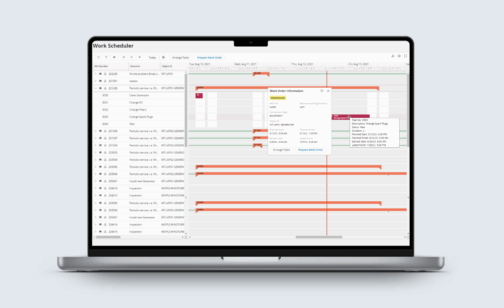
Artificial intelligence is becoming an increasingly integrated part of modern ERP systems. Within IFS Cloud, IFS.ai offers a built-in suite of AI capabilities designed to support data analysis, automate workflows, and enable real-time decision-making. These features are embedded directly into the platform and available out of the box. This article takes a closer look at how IFS.ai contributes to operational efficiency within ERP environments. It also explores how low-code tools like Novacura Flow can extend and adapt these AI-driven capabilities to better fit the unique needs of different organizations. Understanding the Power of IFS.ai: Intelligent Decisions, Streamlined Operations IFS.ai is engineered to revolutionize business operations by offering a comprehensive suite of AI-driven features that enhance decision-making and optimize various functions. Here’s a closer look at its transformative capabilities: Optimized Efficiency: IFS.ai improves process efficiency and resource utilization, automating routine tasks and minimizing manual intervention. This leads to greater operational efficiency, freeing your workforce to focus on strategic initiatives. Ease of Implementation and Operation: A key advantage of IFS.ai is its embedded nature within the IFS Cloud, meaning it’s not a separate add-on but an integral part of the system. This “embedded, not bolted-on” approach simplifies deployment and reduces implementation complexities. Furthermore, the intuitive design, especially with features like the IFS.ai Copilot, makes it highly user-friendly. Employees can leverage AI-powered insights and tools without requiring extensive technical expertise, fostering rapid adoption and ensuring that the benefits of AI are accessible across all levels of the organization. Companies can explore and scale AI capabilities with clear value, without long lead times or complex implementations, enabling immediate and measurable results. Intelligent Decision-Making: By leveraging AI, IFS.ai transforms raw data into actionable insights across strategic, tactical, and operational levels. It supports enhanced decision-making through features like predictive maintenance in Enterprise Asset Management (EAM), intelligent financial management with AI-powered forecasting, and streamlined HR processes with AI-powered competency recommendations. Enhanced User Experience: The IFS.ai Copilot, a pivotal feature, offers AI-assisted guidance and timely knowledge, significantly improving decision-making and overall user experience. It can surface critical insights across the organization, assisting various roles from service leaders to production managers. Industry-Specific Applications: IFS.ai is embedded across key modules and tailored for specific industries, ensuring that the AI capabilities are highly relevant and impactful to diverse business needs. Read more on IFS.ai IFS.ai Integrations Across Key Modules and Capabilities IFS.ai delivers Artificial Intelligence across virtually all IFS Cloud capabilities, rather than being confined to specific, isolated modules. This pervasive integration means AI enhances functionality across: Enterprise Asset Management (EAM): Predictive maintenance, anomaly detection, FMECA (Failure Modes, Effects, Criticality Analysis) assistance. Field Service Management (FSM): Optimized scheduling, intelligent dispatch, service request routing, technician support. Manufacturing: Production scheduling optimization (MSO), demand planning, quality control, automated data capture from shop floor. Supply Chain Management: Inventory optimization, demand forecasting, logistics and transport planning. Finance: AI-powered forecasting, automated invoice processing, intelligent payment allocation. Human Capital Management (HCM): Competency and certificate recommendations, time management assistance. Projects: Project scheduling, risk assessment, resource allocation. Procurement: Supplier performance analysis, spend optimization. Sales & CRM: Sales […]
Answering the question about whether it’s worth upgrading now: Yes, it’s better to start working with IFS Cloud now and be part of its development! Östen Westman Sales Director (Business Systems) Introduction In our previous articles, we covered the business strategy and the technical “plumbing” of an IFS Cloud upgrade. But even the most perfect technical setup will fail if the organization isn’t ready to embrace it. Moving to IFS Cloud requires more than just training on a new interface – it requires a fundamental shift in how your company thinks about software. In this episode, we explore the organizational hurdles of the transition. We discuss how to bridge the competency gap and how to prepare your team for the “Evergreen” world, where updates are no longer a rare event, but a continuous journey. Meet the Experts Host: Łukasz Majer, Business Solutions & Marketing – (LM) Experts: Klas Klasman, Project Office Director – (KK) and Östen Westman, Sales Director – (OW) Navigating the “Evergreen” Mindset LM: The term “Evergreen” is a pillar of IFS Cloud, meaning the system is constantly updated. However, for many organizations used to “freezing” their system for years, this sounds exhausting. Klas, how do you manage this organizational shift? KK: You’ve hit the nail on the head. Historically, an ERP upgrade was a “big bang” event every 5 to 7 years. You did the project, then you forgot about it for half a decade. With Evergreen, that cycle is broken. You now receive updates twice a year. The challenge is organizational: you need a permanent “Release Management” mindset. This means your Super Users can’t just go back to their daily jobs and forget the ERP. They need to proactively review change logs and test new features in a sandbox environment regularly. It sounds like more work, but it’s actually about “small steps” instead of “giant leaps.” It prevents your business from ever becoming obsolete again, but it requires a culture that values continuous improvement over static stability. LM: Does this mean companies need to change their internal support structures to keep up with these updates? KK: Absolutely. You need a dedicated rhythm. We recommend setting up a permanent “IFS Cloud Steering Committee” that meets not just during the project, but throughout the year. Their job is to look at the upcoming IFS roadmap and decide which new features will actually drive value for the business, rather than just reacting to technical updates. Why IFS Cloud? Summary of the Section – for more details, check Episode 4 of our webinar! The Competency Gap: Identifying the new technical and functional skills required for the Aurena (web) client. Shifting Super Users from “implementation roles” to “continuous improvement roles.” User Adoption Strategies: Using early live demos and hands-on “sandbox” testing to reduce fear of the new UI. Moving away from traditional manuals toward role-based, intuitive screen configurations. Embracing Evergreen: Establishing a permanent release management process to handle bi-annual updates. Shifting the organizational culture from “frozen” systems to continuous evolution. Data Ownership: Moving the responsibility for data quality from the IT department to the business […]
Answering the question about whether it’s worth upgrading now: Yes, it’s better to start working with IFS Cloud now and be part of its development! Östen Westman Sales Director (Business Systems) Introduction Welcome to the third part of our series on IFS Cloud Upgrades. While our previous articles focused on business benefits and high-level strategies, we are now “opening the hood.” A move to the cloud isn’t just a version update; it’s a fundamental shift in how your ERP communicates with the world. In this episode, our experts dive deep into the technical challenges encountered in the field. We’ll discuss the shift toward an API-first world and why your data quality is the ultimate “make or break” factor for project success – and how Novacura ensures you come out on top. Meet the Experts Host: Łukasz Majer, Business Solutions & Marketing – (LM) Experts: Klas Klasman, Project Office Director – (KK) and Östen Westman, Sales Director – (OW) Modernizing Integrations With OData And REST Apis LM: In previous versions of IFS, we relied heavily on direct database access or older integration methods. Now, IFS Cloud is “API-first.” Klas, what is the biggest technical hurdle for companies when moving to OData? KK: The shift to OData and REST APIs is probably the most significant architectural change. In the past, many customers built “tight” integrations that lived inside the database. In IFS Cloud, that’s no longer an option. You must communicate through the API layer. The challenge isn’t just “rewriting” code; it’s about performance and security. OData is powerful and flexible, but if not implemented correctly, it can lead to latency issues, especially with high-volume legacy systems. However, the benefit is huge: by using APIs, you decouple your systems. This means when IFS releases an update, your integrations don’t break. It’s a prerequisite for the “Evergreen” state we keep talking about. LM: Many technical teams are worried about the complexity of managing these hundreds of new API endpoints. How does Novacura simplify this transition for a developer who is used to the “old way”? KK: This is exactly where we provide a massive shortcut. Instead of writing complex, manual code to handle every OData call, we use Novacura Flow as an integration layer. We have a dedicated IFS Cloud Connector that “speaks” OData natively. It allows you to map your data visually and handles the technical heavy lifting – like authentication and session management – automatically. This means you can keep your legacy integrations running by using Flow as a “bridge” between the old on-premise world and the new IFS Cloud API world. You get the benefits of the cloud architecture without the headache of a 100% manual rewrite of every integration. Why IFS Cloud? Summary of the Section – for more details, check Episode 3 of our webinar! The OData Shift: Transitioning from PL/SQL and direct DB access to a secure, REST-based API architecture. Ensuring integrations are “outside” the core to support seamless future updates. Modifications Management: Using the “IFS Cloud Scan” to identify which modifications can be replaced by standard […]
Answering the question about whether it’s worth upgrading now: Yes, it’s better to start working with IFS Cloud now and be part of its development! Östen Westman Sales Director (Business Systems) Introduction Welcome to the second installment of our series on transitioning to IFS Cloud. After discussing the business drivers in part one, we are now diving into the “how.” Choosing your upgrade strategy is the most significant decision you’ll make at the start of the project. It dictates not only your budget but also how your system will perform for years to come. In this article, based on our expert webinar, we focus on two pivotal dilemmas: choosing between a technical upgrade and re-implementation, and answering the pressing question – why is now the right time to start? Meet the Experts Host: Łukasz Majer, Business Solutions & Marketing – (LM) Experts: Klas Klasman, Project Office Director – (KK) and Östen Westman, Sales Director – (OW) Technical Upgrade Vs. Re-implementation: Which Road To Take? LM: Many customers wonder if they should simply “lift and shift” their current system or start with a clean slate. Klas, what are the primary differences between these approaches? KK: It’s the classic “Brownfield” vs. “Greenfield” debate. A Technical Upgrade (Brownfield) involves moving your existing processes, data, and modifications into IFS Cloud. It is generally a faster route, but it carries the “baggage” of the past. If your system was implemented 10 or 15 years ago, you likely have processes that no longer fit today’s business reality.Re-implementation (Greenfield), on the other hand, is a “clean cut.” You start from scratch, leveraging the “Best Practices” embedded in IFS Cloud. This is the perfect moment to shed unnecessary modifications and simplify your operations. While it might seem like a longer journey, it often proves cheaper in the long run because you eliminate technical debt.There is also a “third way” – a hybrid approach where we selectively choose which data and processes to migrate and which to rebuild. The choice depends on how far your current system deviates from the standard and how “clean” your data is. LM: When we talk about choosing a path, how much does the volume of existing customizations influence that decision? Is a high number of modifications a “deal-breaker” for a simple technical upgrade? KK: It is often the deciding factor. If you have hundreds of modifications, a technical upgrade can become just as complex as a fresh start, because you have to “re-map” every single one to the new architecture. This is where we advise a “business value audit.” We often find that a large portion of those old modifications are no longer needed because IFS Cloud now covers them in the standard version. By choosing re-implementation, you stop paying to maintain code you don’t even use. It’s about “de-customizing” the core to make your business more agile. Why IFS Cloud? Summary of the Section – for more details, check Episode 2 of our webinar! Defined Upgrade Routes: Clear distinction between Technical Upgrade (Brownfield) and Full Re-implementation (Greenfield). Option for a hybrid “Step-by-Step” approach via IFS […]
Answering the question about whether it’s worth upgrading now: Yes, it’s better to start working with IFS Cloud now and be part of its development! Östen Westman Sales Director (Business Systems) Introduction You are about to read the first article in our series of five blog posts on the IFS Cloud Upgrade projects. These articles have been written based on interviews with our experts and recorded in the form of webinars (see the end of the post). We recorded more than four hours of in-depth knowledge about IFS Cloud, all brought to you by our industry experts and gathered throughout the execution of more than 50 IFS-related projects. Discover optimal upgrade strategies alongside the challenges and solutions encountered in the field. In the first article, you will learn why leading businesses are transitioning to IFS Cloud. Gain insights into the direct benefits of this shift, including: Automatic updates, avoiding major future upgrades Scalable infrastructure for new branch integration Harmonious cloud service integrations Boosted performance and reliability Drastic cuts in on-premise IT expenses Understand the consequences of upgrade delays, support discontinuation for old versions, rising maintenance costs, and missed early adopter discounts. Meet the Experts Host: Łukasz Majer, Business Solutions & Marketing – (LM) Experts: Lars Steen, VP (Services Division) – (LS) and Östen Westman, Sales Director (Business Systems) – (OW) Why have ERP in the cloud? – MARKET TRENDS Lukasz Majer (LM): Why now is the right time to consider a cloud upgrade for the ERP systems? Could you quickly describe the situation in the market? Are all the major ERP vendors already in the cloud? Lars Steen (LS): If you take a tour through the websites of major ERP players today, you will see “cloud” mentioned all over. Cloud is the primary message for everyone. This trend started more than 10 years ago with solutions like Salesforce and NetSuite, which were built natively for the cloud. Now, all the major players—SAP, Infor, IFS, Microsoft—are producing cloud solutions. There are various reasons for this, including different business models and agreements, but the general direction is clear: cloud is the future. One reason for this is that shifting to the cloud is more cost-efficient for vendors, allowing them to focus their development resources on fewer releases. However, a major driver is the shift in business models. The cloud enables vendors to offer subscription-based models, moving away from the old perpetual license models. This transition stabilizes the company, providing a reliable revenue stream and allowing for better future planning and investment. Additionally, the move to fewer releases means vendors only need to maintain one version of the software, significantly reducing the complexity and cost of supporting multiple versions simultaneously. Long-term, a single-version strategy is the future of ERP in the cloud. LM: We’ve discussed the benefits from the ERP vendor perspective. How about from the customer’s point of view? LS: There are several benefits from the customer perspective as well. The big conceptual change is moving from updating your solution every five or seven years to […]
Most ERP users who are not already in the Cloud are likely considering migration. We’ve consulted our top experts to understand why upgrading is worth it, what the best strategies are, and how to plan the entire project. In our new series of webinars, we focus on upgrading to IFS Cloud, aiming to highlight all the pros and cons of the process. Join us and embark on a journey of IFS cloud upgrade! Subscribe to IFS Cloud Upgrade Webinars IS NOW THE RIGHT TIME TO UPGRADE? In the webinar series, we explore the landscape of major ERP players. The cloud has become the primary focus, with SAP, IFS, Microsoft, and others adopting cloud solutions. In this opening episode, our experts Łukasz Majer, Lars Steen and Östen Westman dive deep into the world of ERP, sharing invaluable insights on the benefits of migrating to IFS Cloud, market trends, and the compelling reasons for cloud adoption. Drawing on over 50 IFS projects, we highlight the evolution of ERP systems into the cloud era, emphasizing that it’s not just a trend but a strategic shift embraced by the industry. But the journey to the cloud isn’t a one-size-fits-all narrative. We learn that IFS entered the cloud realm in 2021, a strategic move occurring five years after some of its competitors. However, this timing offers IFS a unique advantage – the ability to learn from early adopters and fine-tune their approach. As the conversation deepens, our experts address the origins of the cloud revolution, acknowledging pioneers like Salesforce and NetSuite, and elaborat on why ERP systems, despite being more complex, have been latecomers to the cloud journey. So, if you’re contemplating an ERP cloud upgrade or just keen on understanding the dynamics of this transformative shift, join us in this series as we navigate the cloud landscape! It’s not just about technology; it’s about a strategic move that could reshape the way your business operates in the digital era. IFS CLOUD UPGRADE UPCOMING WEBINARS Novacura is thrilled to present a series of five insightful webinars designed for clients interested in an IFS Cloud upgrade project. The series will consist of 5 webinars, where our experts are going to take you through the entire upgrade process. You will learn: Why is it worth upgrading?… What are the possible upgrade strategies? What are observed challenges and proposed solutions? (Technical) What are observed challenges and proposed solutions? (Organizational) How to plan the IFS Upgrade project? Join us for the webinar series! Don’t miss this unique opportunity to enhance your understanding of the IFS Cloud upgrade process. REGISTER TODAY AND GAIN ACCESS TO ALL EPISODES OF THE IFS CLOUD UPGRADE SERIES
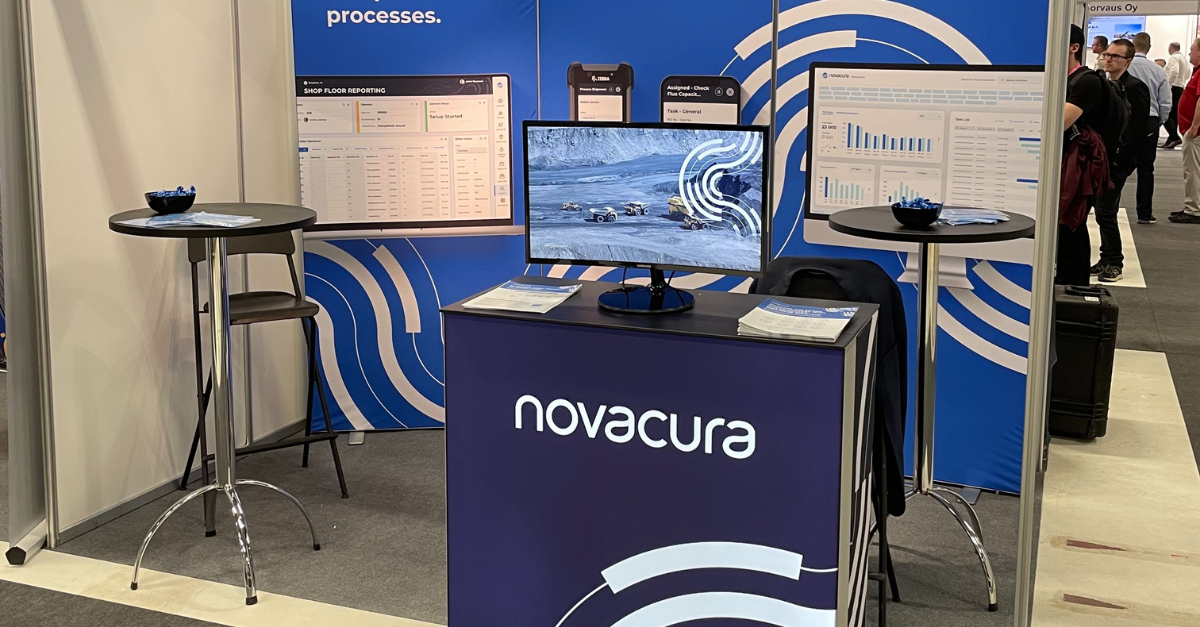
Euro Mining Expo in Skellefteå took place in June, a trade fair for the mining industry and its suppliers. The fair was crowded with booths from the suppliers and people from the mining industry seeking new solutions for their companies. A conference was taking place discussing future possibilities and challenges in the industry. Novacura was naturally there as one of the suppliers of software, discussing the possibilities to support the mining industry with leaner business processes for their ERP solutions with IFS Applications and Novacura Flow for process improvements, integrations and mobile solutions, as well as discussing the same aspects with companies using other ERP solutions.Ricard Lindgren and Calle Göras from Novacura attended the whole week and met with many people at the booth discussing the business processes and their challenges. We met some key contacts and had inspiring discussions around mobility, integration and the solution we offer for the industry. Ricard Lindgren Novacura, Sr. Solution Architect The week was soon over, and we hope that people who visited our booth enjoyed the discussions and got a deeper understanding of what Novacura can do with Novacura Flow and IFS Applications or other ERP solutions. Want to learn more about what Novacura can do for the mining industry? Click here to learn more about Optimizing the entire Mining process with our ERP Applications Related articles : IFS Partner Day Warsaw – A new chapter for Novacura’s presence in Poland learn more IFS Customer Day Finland 2024: Preparing for Evergreen with Novacura learn more Tomorrow Logistics Conference, Poznan – ‘Just in Sequence’ Strategy Case Study learn more Implementing IFS Cloud at Söderenergi – leading Swedish power heating supplier learn more More articles

Users of IFS Applications are facing the challenge of an upgrade to the newly launched version called IFS Cloud. This blog is for you who consider the upgrade but want to know more about what upgrade strategy is the best for you. Two alternative upgrade strategies for IFS Cloud In the webinar “All you need to know to upgrade to IFS Cloud” Klas Klasman, Project Office Director at Novacura, introduces two different routes to move to IFS Cloud. Route #1 – A direct move to IFS Cloud The first route is a direct upgrade to IFS Cloud that allows you to fully use IFS Managed Cloud and when doing that you can still benefit from having an IFS partner to strengthen your organization managing the contacts with IFS. With this route, you will have full adoption of the Aurena interface, new IFS Life Cycle Experience and also the use of REST/Odata protocol for managing your integrations to IFS applications. It’s quite a big step! Route #2 – Move to IFS Cloud via IFS10 The other route is to move to IFS Cloud via IFS 10. In that way, you will stay with the existing life cycle management and existing tools that you’ve known for years – all the way until 2025. With this route, you will be able to continue to use the Enterprise explorer interface and for certain user categories, you can start using the Aurena interface in your phase and likewise with adopting the rest of the REST/Odata protocol for your integrations in your own phase. How to decide on a strategy Evaluate the pros and cons of the different alternatives and ensure you know why you upgrade. Moving directly to IFS Cloud (Route#1) Consider route #1 if you: are in an industry not affected by IFS consolidation have limited critical integrations and modifications have a strategy to move to Cloud Technology believe your users will quickly adopt Aurena need for IFS Cloud only functional feature Note however that there are some specific features e.g. the overall equipment efficiency and some document management features that are not available in IFS Cloud and may not be available in the future either. So if you depend heavily on those and want to continue that you need to consider if you want to go directly to IFS Cloud. Benefits of route #1: Longer lifetime (No end of life) No major upgrades Earlier move to the cloud and closer to the IFS Evergreen philosophy The benefits are that you are immediately onboard the new IFS release cadence that should give you a smoother and more cost-efficient life cycle of your business system. Yes, the benefits of the direct route to IFS Cloud are great but you should assess your situation against these criteria. Go with it when YOU are ready and IFS is ready for your business. Moving to IFS Cloud via IFS Applications 10 (Route #2) Consider route #2 if you: want to continue to use functionality that might not be available in IFS Cloud are not yet ready to replace existing integrations don´t have a Cloud-first strategy. have a great number of heavy key users […]

To upgrade your ERP is always a challenge. A few months ago IFS launched the new version of IFS Applications called IFS Cloud. Many companies are facing the challenge of creating a new upgrade strategy. This blog post is for all of you who are considering upgrading or implementing IFS Applications. We will have a look at some of the highlights from the webinar “All you need to know to upgrade to IFS Cloud”. IFS Cloud – What do we know today about IFS Cloud? Upgrade Strategies – How and when should you upgrade? Why Novacura? – Trust us a solid partner. The launch of IFS Cloud According to IFS, this is the biggest product launch in the company’s history. IFS says that “Cloud enables companies to manage the customer, people, and asset elements of their business in a single solution.” As an independent IFS Partner, Novacura had a chance to follow the release closely and can firmly confirm – this is a big step forward. Many people say Cloud is the future, but maybe not for everyone. The question is if IFS Cloud is right for your business and in that case – how and when should you upgrade? Therefore we asked a couple of our experts to sort out the question marks that often appeared when IFS Cloud was brought up. When should I upgrade? And how should I upgrade? What should I do if I have a lot of modifications in IFS? What should I do if I have a lot of integrations between IFS and other systems? Which partner should I choose to perform the IFS Upgrade? In the webinar, they give explanations and suggestions on how to handle the upgrade – below you find some of the highlights. What’s important to know about IFS Cloud? Östen Westman, Sales Director at Novacura, states that it’s important to understand that IFS Cloud is a complete cloud offering but still possible to implement on-prem based on customer needs with the same functionality. Also, the product is truly one product in IFS Cloud, so all of the different product lines of IFS have been merged into IFS Cloud. The evergreen philosophy has developed even more, now IFS will provide their customer base with two major upgrades every year. In the webinar, he also describes the new improved user experience, the updated technical architecture and the open architecture that is 100% based on Odata which means that all the API:s are now available and ready for integration. IFS Cloud – Key facts In IFS Cloud the customer has a big decision to make – and that is how to deploy the IFS Cloud solution. What does affect this decision is mostly the number of customizations or modifications in the solutions. How and when to upgrade? Firstly, it’s important to lay the ground for a well-informed decision, which means to spend some time answering the right questions to be able to set up a good upgrade strategy. E.g. What’s the reason for your upgrade? Which route to IFS Cloud fits you the best? In the webinar Klas Klasman, Project Office Director at Novacura, introduce two alternatives on how to move to IFS Cloud, so which of them should you choose? Direct move to IFS Cloud Move to IFS Cloud via IFS10 Which route to IFS Cloud fits you best? It’s important to evaluate the pros and cons of the different alternatives and to make a good decision you […]

As IFS Partners we’ve noticed that many of our customers are curious about the newly launched IFS Cloud. Therefore we want to highlight some of the presentations from the second release of IFS Cloud, 21R2, which can help you deliver when it matters most. When watching the presentations you will get highlights from IFS representatives on the latest version of IFS Cloud. You can also access industry-specific presentations about how the latest innovation will benefit your business. Hear, among others, IFS Chief Product Owner, IFS Sr Product Manager and IFS Sr VP of Business Applications talk about the latest release of IFS Cloud. How can it help you on the way to achieving your goals and what tools, features and capabilities are available to do so? 10 release presentations to choose from: 21R2 Product Highlights Value of Evergreen Added Value Services for IFS Cloud IFS Cloud for Manufacturing IFS Cloud for Construction IFS Cloud for A&D Manufacturers IFS Cloud for Aviation Maintenance IFS Cloud for Energy & Utilities IFS Cloud for Telco IFS Cloud for Service Management Access the presentations and find out more about IFS Cloud in the context of your business area by clicking on the button below. Get instant access to industry related videos: Please fill out this form Related articles : Novacura at TUG CONNECTS 2024:ignite! Elevating Infor M3 with Novacura Flow Applications learn more IFS Partner Day Warsaw – A new chapter for Novacura’s presence in Poland learn more IFS Customer Day Finland 2024: Preparing for Evergreen with Novacura learn more Tomorrow Logistics Conference, Poznan – ‘Just in Sequence’ Strategy Case Study learn more More articles

How IFS Cloud meets new customer challenges In this video you get highlights from IFS representatives on the latest version of IFS Cloud. To access industry specific presentations about how the latest innovation will benefit your business, please share some info with us in the form below. IFS Cloud 21R2 – Product Highlights Listen to, among others, IFS Chief Product Owner, IFS Sr Product Manager and IFS Sr VP of Business Applications talk about the latest release of IFS Cloud. How can it help you on the way to achieve your goals and what tools, features and capabilities are available to do so? Watching time: 29 minutes More news about IFS Cloud in the context of your business area. Please tell us a little bit about yourself to get access to videos about: IFS Cloud for Manufacturing IFS Cloud for Energy & Utilities IFS Cloud for Service Management IFS Cloud for Engineering and Construction IFS Cloud for Aerospace and Defense Manufacturers IFS Cloud for Aviation Maintenance IFS Cloud for Telco Added Value Services for IFS Cloud the Value of Evergreen Get instant access to industry related videos: Please fill out this form Related articles : News about IFS Cloud in the context of your business area learn more IFS Cloud Product highlights learn more Novacura in partner interview with IFS learn more

If your company uses IFS Applications and has made—or plans on making—modifications directly to IFS, this article is a must-read. Custom modifications are often necessary to meet the unique requirements of each business. However, any changes made directly to IFS can quickly become a costly and time-consuming endeavor, especially when upgrading to the latest version, like IFS Cloud*. In most cases, companies will need highly skilled professionals to identify changes from one version to the next and then reimplement the modifications from scratch. In this article, we will summarize upgrade challenges that companies often face when making modifications directly to IFS, along with how you can eliminate those them with a low-code platform. *In our previous article, “Is it the right time to upgrade to IFS Cloud”, we present some pros and cons regarding the upgrade to IFS Cloud. We show why an upgrade to IFS Cloud is worth considering as well as how to approach it the right way. Challenge: ERP modifications make upgrades more time-consuming and complex When it’s time for a company to prepare for an ERP upgrade (and IFS Applications isn’t specific here!), there are a lot of challenges that need to be managed before you can start the upgrade. One of the more common challenges to address is how to handle custom modifications. A company has to: Identify all modifications (which might be problematic itself). Analyze and understand how current modifications work. Decide which modifications to keep (is the modification still used by our company?). Map modifications to the features available in the new ERP version (something that was missing in the past and was bypassed by a modification to the previous ERP version, might be available as a standard feature in the new ERP). Reimplement the modifications which is not a simple task since it requires highly skilled resources and a lot of testing (be mindful that changes can also impact other areas within the ERP system). In short: upgrades are complicated. There is a need for highly skilled resources, it takes time, and it can cost a lot! Many companies delay how often they upgrade because the process is so complex. However, not keeping up with recent releases can also compound the issue since it requires a bigger leap to upgrade to the latest version. The importance of upgrades with IFS Cloud IFS encourages companies to upgrade more often to take advantage of the latest and greatest version. With IFS Cloud, IFS promises to release upgrades at least two times a year. While this can make it easier, since you won’t have as big of a jump between versions, you will still need to repeat the upgrade routine often. Solution: Use a low-code platform to handle modifications outside of your ERP system Long before an upgrade project starts, you must make a fundamental change to your ERP customization strategy to avoid some of the upgrade challenges mentioned above. Our recommendation (based on our experience and proven by multiple implementations) is to manage modifications outside your ERP system by implementing them externally. We recommend using a low-code platform to create […]

We´ve noticed a gap that is causing an issue with information accuracy due to a broken information flow between operational systems (used in daily production) and business systems, like planning systems, reporting systems and financial systems. This “gap” consists of 3 elementary problems: Information is gathered manually Very often by maintenance activities. It increases maintenance costs but causes another big problem: downtime. Maintenance measures are often disruptive to production and in many cases, a machine must be switched off to be able to perform certain measures. dfg esgfwsefaw Information comes too late Decision-makers (that operate at the business systems level) cannot see accurate and up-to-date information since it’s gathered and imported manually. It generates delays counted in days. And it has a fundamental impact on planning accuracy and the quality of decisions made by planning managers. Information is not precise enough Because of the problem with the manual gathering of the information and its disruptive impact on the production, the operation is not measured on every production stage with the required quality. It means that decision-makers, even if they measure some problem at the end, cannot effortlessly identify the root of the issue in the process. And the scale of the problem is big – the utilization in the mining industry compared to other similar industries is still relatively low. Typical mining facility can be at 65-70% availability, while – i.e. hydropower production in hydropower plants achieve 98 – 99.5% availability around the clock. This simple comparison shows the scale of the potential that still resides in mining. Östen Westman Novacura, Sales Director A communication gateway is a good solution In Novacura, over many years of working within the mining industry, we have developed a technology that solves the above problems. Our proposed solution is to implement Novacura FLOW to act as a Communication Gateway to gather and transmit information from operations to business systems. How to connect mining equipment to business system? Find information on how to increase operational efficiency by improving the accuracy of information provided to managers. Download Thanks to the AI engine connected to the solution (which is available right now in our platform), we will be able to predict future damages and reduce maintenance costs and production breaks. Related articles : How to connect mining equipment directly to your business system. We´ve noticed a gap that is causing an issue with information accuracy due to a broken information flow between operational systems (used in daily production) and business systems, like planning systems, reporting systems and financial systems. This “gap” consists of 3 elementary problems: Information is gathered manually Very often by maintenance activities. It increases maintenance costs but causes another big problem: downtime. Maintenance measures are often disruptive to production and in many cases, a machine must be switched off to be able to perform certain measures. dfg esgfwsefaw Information comes too late Decision-makers (that operate at the business systems level) cannot see accurate […] learn more

This article is addressed to all companies that use IFS Applications. Going forward, such companies should now take into consideration how the latest version of IFS Applications – IFS Cloud fits their Digital and ERP strategy, but, as always, ERP upgrades does not only bring innovation and new functions. It also brings some risks to evaluate – especially when the new version in some areas is a revolution. In this article, we have gathered such risks and we present how to mitigate them. IFS Cloud – the future is here A couple of months ago IFS announced the new version of IFS Applications called IFS Cloud. Novacura, as the independent IFS Partner, had a chance to follow the release and new experiences closely and firmly confirm – this is a big step forward. Below we summarized key benefits of IFS Applications: Fully managed Cloud environment – IFS provides whole hardware and network infrastructure. Takes care of all the administrative work including monitoring, updates, backups, etc. The system environment is achievable from anywhere and can be scaled dynamically to meet the required load. Flexible environment location –IFS Cloud can be located on-prem, in a private cloud or the full cloud offered by IFS. Evergreen philosophy – with IFS Cloud customers get constant access to the newest versions of the IFS system, including 2 big functional upgrades a year. Thanks to the cloud location and new platform architecture, these upgrades can be done “in the meantime”. New user experience – including fully configurable lobby dashboard, new reports, new mobile interfaces, and individual “look and feel” configuration including customer branding/colors. New open architecture – all system functionalities are now achievable for external systems via consistent API based on the “state of the art” API technology – OData RESTful API. New intelligent features – IFS now provided a lot of innovative AI-based capabilities such as a chatbot, dynamic scheduling optimizations (based on Machine Learning) and voice and text recognition. IFS Cloud is the future for all IFS customers. IFS will put a lot of attention to develop it, so this is just the beginning. We will see more Industry-aligned functionality, more user empowerment tools and a platform with open APIs. The reason for this is simple – The benefits from a move to an Evergreen situation with IFS Cloud are closely related to staying close to the Core ERP without modifications to fully take advantage of new innovative functionality being released. What to consider before an upgrade? As mentioned above, IFS Cloud is – no doubt – the future for all IFS Applications customers. The only question that people responsible for IFS Applications might have is: “Is now the right time to upgrade?” Upgrade project brings some risks and challenges. The company should re-analyze its existing processes against new features offered by the new version of the ERP system and try to utilize new possibilities. All existing modifications implemented in the current version should be identified and compared to the new functions offered by the new ERP. Some modifications then should be replaced by […]