Answering the question about whether it's worth upgrading now: Yes, it's better to start working with IFS Cloud now and be part of its development!
Östen Westman
Sales Director (Business Systems)

Introduction

Welcome to the second installment of our series on transitioning to IFS Cloud. After discussing the business drivers in part one, we are now diving into the “how.” Choosing your upgrade strategy is the most significant decision you’ll make at the start of the project. It dictates not only your budget but also how your system will perform for years to come.

In this article, based on our expert webinar, we focus on two pivotal dilemmas: choosing between a technical upgrade and re-implementation, and answering the pressing question – why is now the right time to start?

Meet the Experts

Host: Łukasz Majer, Business Solutions & Marketing – (LM)

Experts: Klas Klasman, Project Office Director – (KK) and Östen Westman, Sales Director – (OW)

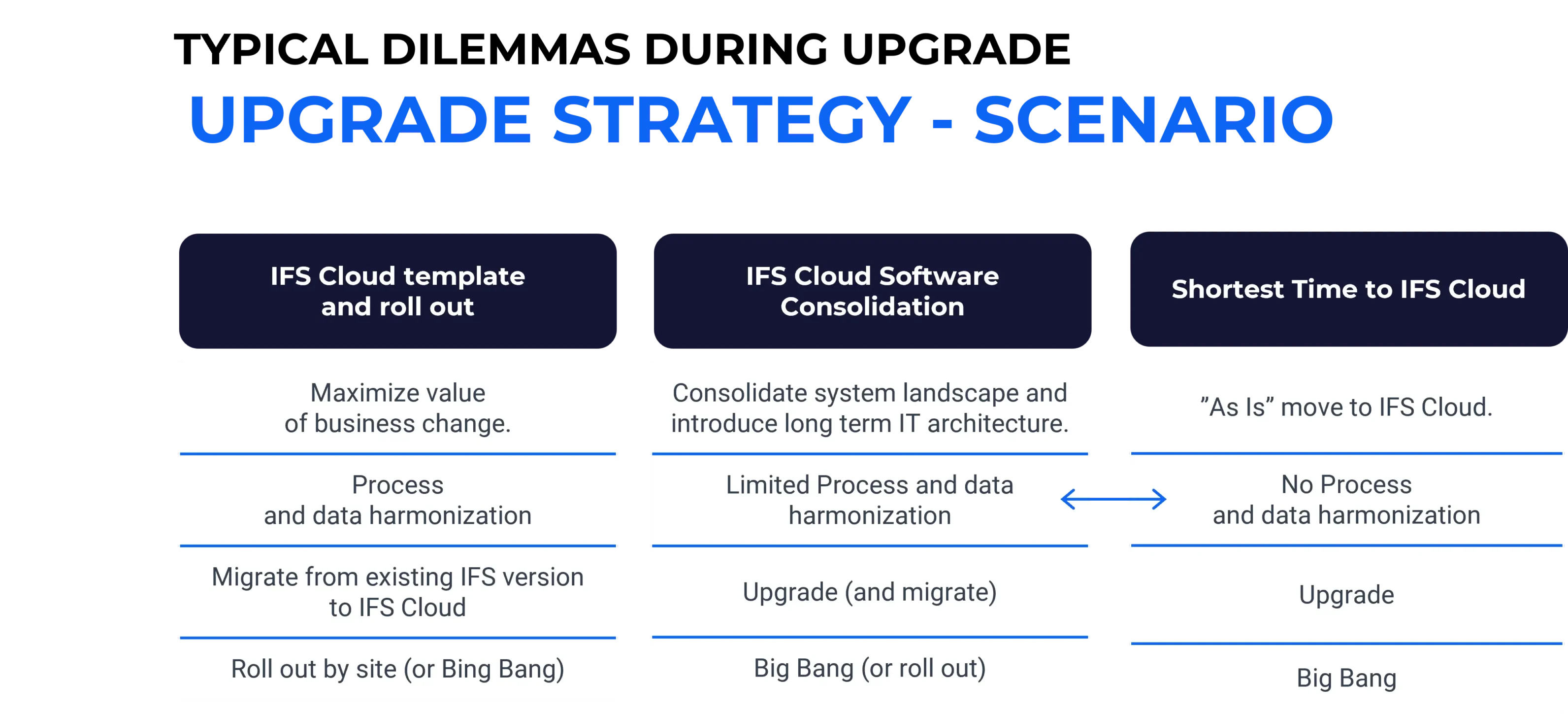
Technical Upgrade Vs. Re-implementation: Which Road To Take?

LM: Many customers wonder if they should simply “lift and shift” their current system or start with a clean slate. Klas, what are the primary differences between these approaches?


KK: It’s the classic “Brownfield” vs. “Greenfield” debate. A Technical Upgrade (Brownfield) involves moving your existing processes, data, and modifications into IFS Cloud. It is generally a faster route, but it carries the “baggage” of the past. If your system was implemented 10 or 15 years ago, you likely have processes that no longer fit today’s business reality.
Re-implementation (Greenfield), on the other hand, is a “clean cut.” You start from scratch, leveraging the “Best Practices” embedded in IFS Cloud. This is the perfect moment to shed unnecessary modifications and simplify your operations. While it might seem like a longer journey, it often proves cheaper in the long run because you eliminate technical debt.
There is also a “third way” – a hybrid approach where we selectively choose which data and processes to migrate and which to rebuild. The choice depends on how far your current system deviates from the standard and how “clean” your data is.


LM: When we talk about choosing a path, how much does the volume of existing customizations influence that decision? Is a high number of modifications a “deal-breaker” for a simple technical upgrade?


KK: It is often the deciding factor. If you have hundreds of modifications, a technical upgrade can become just as complex as a fresh start, because you have to “re-map” every single one to the new architecture. This is where we advise a “business value audit.” We often find that a large portion of those old modifications are no longer needed because IFS Cloud now covers them in the standard version. By choosing re-implementation, you stop paying to maintain code you don’t even use. It’s about “de-customizing” the core to make your business more agile.

Why IFS Cloud?

Summary of the Section – for more details, check Episode 2 of our webinar!


Defined Upgrade Routes:

  • Clear distinction between Technical Upgrade (Brownfield) and Full Re-implementation (Greenfield).
  • Option for a hybrid “Step-by-Step” approach via IFS Applications 10 for companies not yet ready for a full cloud transition.

Strategic Decision Criteria:

  • Analysis of the volume and necessity of existing customizations.
  • Evaluation of current data quality and the need for process “cleansing.”
  • Assessment of how well current legacy processes align with modern IFS Cloud “Best Practices.”

The “Clean Core” Strategy:

  • A focus on returning to the IFS standard to reduce long-term maintenance costs.
  • Identifying “dead wood”—modifications that are now covered by standard IFS Cloud functionality.
  • Strategic use of Low-code (Novacura Flow) to keep the ERP core “modification-free.”

Deployment & Hosting Flexibility:

  • In-depth look at IFS Managed Cloud vs. Remote Deployment (on-premise or third-party cloud).
  • Understanding the operational and financial impact of each hosting model.
  • Security and compliance considerations for different industry sectors.

Lifecycle & Support Timing:

  • Clear timeline for the “End of Support” for IFS Applications 8, 9, and 10.
  • Mitigating the risk of the “Resource Crunch”—securing expert consultants before the market becomes saturated.
  • Avoiding the rising costs of extended support for legacy versions.

Early Adopter Advantages:

  • Immediate access to IFS.ai and machine learning capabilities.
  • Transitioning to the Evergreen model sooner to eliminate the need for future “big bang” upgrades.
  • Capitalizing on current vendor incentives and “Early Adopter” discounts.

Future-Proofing with Low-Code:

  • Leveraging Novacura Flow as a bridge during the upgrade process.
  • Using OData APIs to ensure seamless integration with external systems.
  • Building an agile architecture that allows for continuous updates without breaking business-specific workflows.

Project Planning & ROI:

  • Emphasis on thorough analysis before committing to a specific path.
  • Balancing initial project costs against long-term operational efficiency.
  • Structuring the project to ensure minimal disruption to daily business operations.

WHY UPGRADE NOW?

LM: Östen, we often hear: “Let’s wait another year for the system to mature.” Why is waiting a mistake, and why should customers choose Novacura as their partner right now?


OW: To put it bluntly: time is not on the customer’s side. There are three main reasons to move now:
The “Resource Gap”: Support for IFS Applications 10 and older versions has an expiration date. As we get closer to those deadlines, the availability of expert consultants will plummet. By starting now, you secure the best resources before the market gets overcrowded.

The Competitive Edge (AI & Evergreen): IFS Cloud isn’t just a new UI. It’s your gateway to AI (IFS.ai) and the Evergreen model. Every month you wait is a month your competitors might be using these tools to outpace you. You don’t want to be running on an “old engine” while the industry moves to autonomous ERP.

The Novacura Advantage: Why us? Because we don’t just do a “standard” upgrade. With our Novacura Flow platform, we help customers move their modifications outside the ERP core. This is a game-changer. We prepare your system so that future “Evergreen” updates are a non-event—simple and low-risk. By choosing us now, you aren’t just upgrading; you are cleaning your architecture for the next decade.
Starting today with Novacura means you get a strategic audit that identifies where you are actually losing money in your current processes, ensuring the upgrade pays for itself.

CONCLUSIONS

In summary, choosing the right upgrade path—whether it’s a technical shift or a full re-implementation – is a strategic decision that defines your long-term agility. By addressing legacy modifications now and securing expert resources early, you avoid the upcoming market crunch and pave the way for a “clean core” environment. Transitioning to IFS Cloud today isn’t just an IT update; it’s about securing your competitive edge for the Evergreen future.

Upgrade Your System: Free Checklist & Support

Need help with your system upgrade? Download our free checklist to guide you through the process. Enter your email to get the download link.

Efficient Upgrades in Two Weeks

Consider our professional support for a smooth upgrade. We provide a clear strategy and thorough audit to meet your needs.

ARTICLES AND Webinars in the Serie

  • Episode 1: Why is it Worth Upgrading?
    Blog
    Webinar
  • Episode 2: What are the Possible Upgrade Strategies? 
    Blog
    Webinar
  • Episode 3: Observed Challenges and Proposed Solutions – Technical
  • Episode 4: Observed Challenges and Proposed Solutions – Organizational
  • Episode 5: How to Plan the IFS Upgrade Project 


Join us to stay updated and learn more about the benefits and strategies for a successful transition to IFS Cloud! 

Östen Westman

Sales Director (Business Systems), Novacura