

Publications
:

Low-code makes complex business processes simple, visual, and fast to adapt. Easily customize ERP and CRM systems without deep coding knowledge.

What is a Low-Code Platform? A low-code platform is a software tool that lets you create applications with minimal coding. Instead of writing complex code, users can use simple drag-and-drop features, visual interfaces, and pre-built templates to build apps quickly. Low-code platforms are great for businesses because they allow people without advanced programming skills to create, modify, or improve software. This makes it faster and easier to develop solutions that fit specific needs while saving time and reducing costs. Challenges Related to ERP Systems At Novacura, we have over 15 years of experience in implementing and enhancing various ERP systems, leveraging our low-code integration platform. Throughout our work, we’ve noticed that regardless of the ERP system a company utilizes, there are common challenges that many organizations encounter. In this article, we summarize the key challenges related to ERP systems that our customers often face. Complexity for Users ERP systems are advanced and encompass numerous modules that provide hundreds of capabilities. However, they also introduce a degree of complexity, which can present challenges with ERP implementation. The wide range of available functions gives users flexibility but does not guide them in following the correct path to accomplish their tasks. As a result, seemingly simple tasks (such as creating a new customer in the system) may require several additional steps to be completed by the user before they can finalize the task. Users must be aware of these additional steps; otherwise, they will be unable to complete their work successfully. Limited Integration Capabilities Complexity is not the only drawback of ERP solutions. These platforms are primarily designed to serve as central points within the IT landscape. Other applications need to integrate with ERP solutions to communicate effectively. However, ERP systems typically do not provide ready-to-use connectors for third-party software. Instead, they offer APIs, leaving the integration to the other applications. As a result, connecting an ERP solution with a new third-party tool is not straightforward; customers cannot simply select a connector from the ERP marketplace, establish a connection, and start using it. Limited Customization Another issue with ERP systems is that they are designed for multiple companies across different industries within the same version. Although they offer a wide range of configuration parameters, they cannot be perfectly tailored to the specific needs of each organization. This creates a gap between the actual processes within a company and the fragmented processes supported by the ERP system. As a result, employees often resort to workarounds and begin operating outside the ERP by using Excel sheets, emails, and paper documents. Expensive Modifications To address the issue of relatively limited customizations, ERP vendors allow customers to create modifications to the software. However, these modifications often lead to complications and contribute to ERP implementation challenges. Since they are not separate from the ERP core, the entire architecture becomes more complex, making it difficult to identify and track all modifications. This is especially crucial during upgrades, as all altered components of the previous ERP version must be identified, documented, and typically rewritten in the new version. Mobility Modern ERP solutions, such […]

A well-functioning business environment comprises a complex of operations that require highly efficient management at multiple levels. To operate the business sufficiently, organizations implement various digital systems and tools to support daily routine tasks. The lack of good integration makes business practices much more difficult when it comes to running large-scale operations (...)

Can you make Industry 4.0 manageable and profitable? At the same time, the technology, the processes, and even the products associated with Industry 4.0 are full of complexities and uncertainty. How do you manage the communication between all parts of the system securely? How to make any sense of the massive amount of data being produced? How can you connect everything and everyone involved in the process seamlessly and smoothly? The answers to these questions and many more are available directly from the file below. See how to manage Industry 4.0 requirements in your workplace. What Industry 4.0 is really about? Find the starting point Low-code as the Industry 4.0 engine Standardize data and make it scalable Increasing utilization of old machines Download Related articles : How low-code can unlock the business value of Industry 4.0 learn more Mobile solutions for WMS based on Novacura Flow learn more Reduce costs with returnable packaging management in supply chain learn more How to optimize cooperation between Production and Maintenance learn more More articles #Contact

Picture this. You’re one of the largest beer manufacturers in the world, with thousands of employees and global name recognition. Your products have prominent locations in nearly every liquor store. But your inventory management processes—including ordering new products and getting those products out to retailers—is an administrative nightmare. People in the field need to keep track of inventory, sales, product specs and more. But that information isn’t updated in real-time: instead, the back office emails spreadsheets to the field sales team every few hours. This leads to poor inventory control, frustrated sales people and unhappy customers. This is the situation Carlsberg found themselves in at the end of 2013. But just a few months later, Carlsberg had: cut administrative time by up to 90%drastically improved data quality and speedeliminated their dependance on spreadsheetsHow did they do it?Through business process management. Specifically, Carlsberg analyzed their business processes, discovered inefficiencies, and used BPM software to digitalize their inventory management and ordering processes. These changes meant that: administrative staff weren’t constantly updating spreadsheetsfield sales reps could check inventory in real-timeall employees were more productive and could devote time to more valuable tasksThe results Carlsberg saw from their BPM initiatives are great. But more importantly: they’re not unique. Nearly every business—from the biggest corporations to tiny startups—can benefit from BPM. But before you jump in and start changing up your processes, it’s important to know what BPM is (and isn’t), how the BPM lifecycle works and how to measure the success of your BPM efforts. The team here at Novacura have been helping businesses achieve BPM success for over 14 years. We’ve even created our own business process management tool, called Novacura Flow, that you can use to map, analyze, model and optimize your business processes—and connect your processes directly to your business systems, like your ERP, MES, CRM, and WMS. So it’s safe to say that we’re experts in business process management, and we know the ins and outs of BPM initiatives both large and small. And now, we want to share our BPM knowledge with you. So let’s get started. What is business process management (BPM)? BPM is a group of principles, methods and tools to design, analyze, execute and track business processes with the goal of getting more value out of them. This value might be internal—better efficiency, higher quality products, faster shipping times—or it might be customer value (better service, faster reply times, etc.). The official definition of BPM, according to bpm.com, is this:Business Process Management (BPM) is a discipline involving any combination of modeling, automation, execution, control, measurement and optimization of business activity flows, in support of enterprise goals, spanning systems, employees, customers and partners within and beyond the enterprise What do you mean by a “business process”? A business process is the way you deliver a product or service to your customers. Business processes provide structure and help you create repeatable, executable tasks. Without business processes, you wouldn’t be able to do the same thing twice—ever. To put it another way: your business is made […]

Why should CMMS be integrated? “Is it worth it?” is one of the fundamental questions that should be asked before any business decision. It is no different when it comes to integrating enterprise systems. When talking about manufacturing automation, integration should not be overlooked. But what are the benefits, risks and finally – is it worth it? Computerized Maintenance Management System (CMMS) are intended to coordinate all maintenance activities, thanks to which production is continuous. This approach requires the coordination of the work of many departments. The CMMS needs to be informed quickly of any update from which it will recommend or make decisions. The overall value that CMMS system can bring and all investments spent on its implementation might be ruined, if CMMS doesn’t operate on accurate and updated information. A good example is the planning module of the CMMS system, which – if implemented correctly – might have a huge positive impact on downtime optimization in production. But maintenance plan prepared in CMMS will simply be incorrect if it is based on incorrect or outdated data (and this is usually the result of manual data rewriting between systems). As a consequence, the prepared plan will not utilize natural breaks in production for maintenance activities, or the company can order additional spare parts that are already in the company’s possession but have not yet been in the evidence possessed by the CMMS system. Inefficient business process solution Through integrations, data can be shared and exchanged between different software applications directly and without delays, to better understand your business processes. And no doubt – the most important system to integrate CMMS with is the ERP system. Moreover, all systems should see the same production infrastructure objects and the same resources and therefore, the company will be able to track all operations related to the same objects in different areas and systems (financial perspective, maintenance perspective, utilization in production, etc.). We’re technologically ready to do the integration and the cost of such an investment is worthwhile. Automation, precision and efficiency in data propagation are some of the major reasons why modern companies integrate CMMS. Integration of software is a key for streamlining business processes, simplifying data analysis and reporting. Also, it will contribute to higher profitability and growth. Efficient business process solution Where is the master information in CMMS or in ERP? Before we consider different integration scenarios between CMMS and ERP system (what data should be transferred? should it be sent or received?) we should firstly decide on where the master (primary) information resides. Multiple objects and transactions related to maintenance will be stored and processed in both systems (like physical assets, maintenance expenses, etc.). So before planning the ERP data integration, we should decide on where is the primary copy for that data and in which system should we process these data. As a consequence of that decision, we will be able to plan the data exchange direction (from CMMS or to CMMS) for particular objects. There is no one and right scenario […]
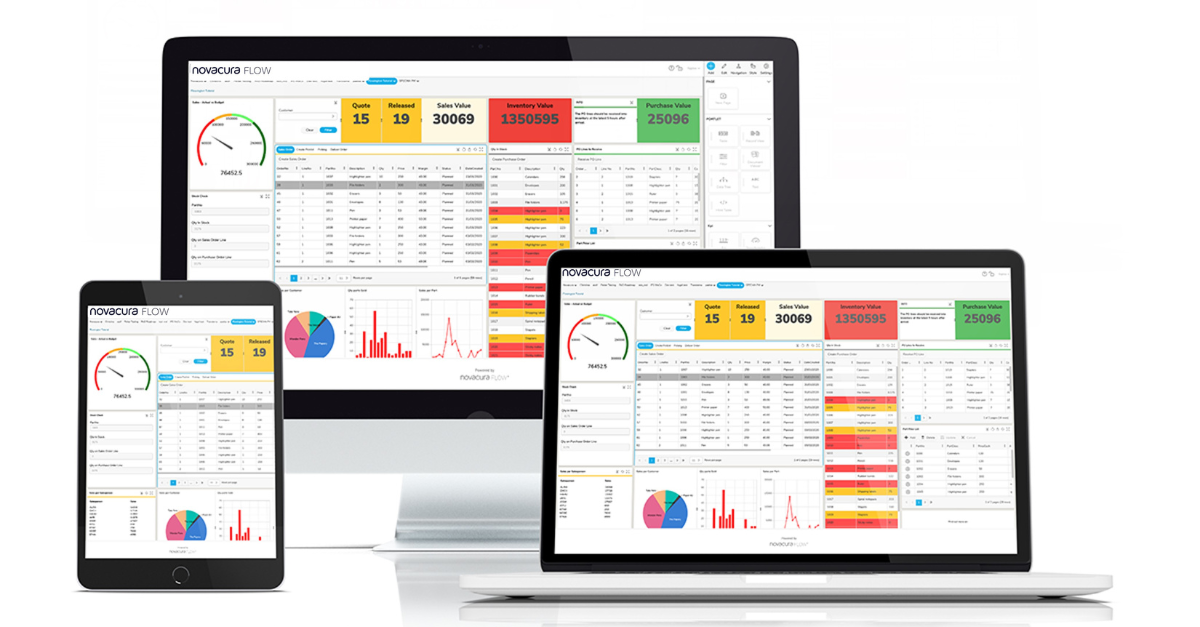
Did you know, some companies still need to access several systems to manage their business processes. Wasting time just trying to find the problems instead of solving them, especially when some parts of the process aren’t yet digitized. Find the gaps in your business processes The struggle mentioned above is unfortunately still a reality for many of the companies we talk to. The lack of time makes it hard to improve their business processes. We couldn’t be happier to present them the opportunity to take control and achieve BPM success – with dashboards that do more. See your whole business on one screen Monitor important KPIs in real-time Connect to all your business systems Save time on data entry Use it in the office or in the field A solution connected to your ERP system First, we shortly need to describe Novacura Flow, which is a low-code, high productivity business process platform that can connect multiple business systems into a single, simple, user-friendly interface. This platform helps you build, execute and optimize business processes to run your business the way YOU want to. Three components of the Novacura Flow platform: Flow Studio – where you design your process Flow Client – where you execute your process on any device Flow Portal – which makes it easy to see all your important information at a glance Improve your business performance As you see there are several parts of Novacura Flow but right now we would like to focus on the above-mentioned game-changer, Flow Portal. This part of the platform adds an extra dimension to Novacura Flow where you can control your entire business—data, workflows, processes, dashboards, reports and more. Flow Portal is where all your data comes together. Use the portal to visualize and monitor your KPIs, improve your processes and stay on top of everything. As soon as you get the overview, it’s easier to see where the potential of reaching your business goal is. Identifying where you can make minor changes can really make a difference. Common actions you might want to consider include: reducing the number of customer touchpoints eliminate non-value-adding tasks give employees more autonomy to collect data and make decisions add/automate control tasks, like checking that all form fields have been filled out correctly automate your more predictable and repeatable tasks You can customize Novacura Flow to reach YOUR business goals. Curious about this digital solution? Find out more about the platform – Novacura Flow. Related articles : 6 ways for Novacura Flow customers to collaborate and get knowledge learn more Meet the Novacura Marketplace learn more How to improve your business processes – all in one place learn more The benefits of mobile work orders learn more

Not every business process is perfect in its first iteration. In fact, almost all business processes need some finessing to achieve the best results. But figuring out exactly which improvements to make can be a challenge. What’s the solution? A root cause analysis. What is a root cause analysis? A root cause analysis is a way to identify the true cause of problems, issues and inefficiencies—in business processes or anything else, really—and to develop an approach for responding to them. Fixing the underlying cause of a problem, instead of just treating the symptoms, will improve process quality and save time, too: time you might be spending right now fixing the symptom of the problem instead of the problem itself. Think of it this way. Imagine you find mold in your house. What’s the first course of action? You might want to start by cleaning the surfaces with mold on them. But if all you do is clean the surface, the mold will keep coming back. In order to get rid of the problem for good, you need to deal with the problem at its source. How to perform a root cause analysis on a business process Assemble a team. Yes, you can conduct a root cause analysis on your own. But when you’re trying to find the best solution to a problem, it’s important to get input from many different perspectives. For example: if the root cause of the problem has to do with data migration, and you don’t know how or where company data is stored, you won’t have the right knowledge or perspective to get to the root cause. Together, define the issue. Be as clear and specific as you can. Analyze the issue using one (or more) of the root cause analysis techniques described below. Once you’ve determined the root cause of the issue, decide on the best plan of action. Implement your action plan. Root cause analysis techniques Five Ms The Five Ms is a root cause analysis used in both Lean and Six Sigma. The idea behind the five Ms is to look at the issue from different perspectives to try and pinpoint the cause, not just the symptoms. The standard Five Ms are: Man/mind power Machine (equipment, technology) Material (includes raw materials, consumables and data) Method (process) Measurement/medium (inspection, environment) Some people like to add a sixth M here: Mother Nature. Some people like to use an E instead: Environment. But the process is still the same. Think about the problem through the lens of these different factors, and see if you can find the root cause. Once you’ve analyzed the problem with the Five (or Six) Ms, you may want to visualize the problem in an Ishikawa (or “fishbone”) diagram. This video shows you how: Five Whys The five whys is pretty much as the name suggests: looking at a problem and asking “why” five times. Here’s an example: Problem: Items aren’t being shipped on time. Why aren’t they being shipped on time? There’s not enough stock in the warehouse. Why isn’t there enough stock […]

You’ve probably heard that business process automation—the method of automating tasks that are part of business processes—can help your company work faster, be more productive, and even save money. Sounds great, right? But what does business process automation look like in practice?

So, you’ve decided that you want to take your processes mobile. You’ve run the numbers, looked at all the options and decided that a mobile app is the way to go. Getting your workers to use the new technology should be a no-brainer, right? It’s going to make their jobs faster and easier. Everyone can see that. So you launch the new app, and everyone’s really excited to try it out. But after an initial burst of enthusiasm, a lot of your workers stop using the app and go back to doing things the “old way”. When you ask them why, they have a bunch of reasons: the new app is confusing, they don’t know how to use it, it’s caused errors, it’s buggy, they can’t use it while they’re doing something else, etc. They say it’s easier to keep doing things the old way than to try and figure out the new app. So you shut down the app and start the hunt for something new. What happened? Is the technology to blame: was it really too confusing? Or did you, like many people, forget to include a user adoption strategy as part of your implementation plan? In this blog post, we’re going to explain what user adoption is, why it matters and how you can make sure your next tech implementation is a success with your workers. What is user adoption? As the name suggests, user adoption is the process of getting users to adopt something: a new piece of software, a new way of working, etc. Simple, right? The problem is: humans are naturally resistant to change. If you just hand someone a tool and expect them to use it, with no explanation of how or why, they’re probably going to be a bit resistant. Successful user adoption isn’t just putting the tool in the user’s hand: it’s explaining to them why the tool is important, how the tool should be used, and what will happen if the tool isn’t used correctly. So, user adoption relies on user buy-in. Users don’t care which app platform you choose: they care whether or not the app will work for them. Will it help them work faster and better? Will it reduce the time spent on boring, repetitive work? Will it make their lives easier in some way? If so, make this point clear. Show them the value of using the new tools. User adoption for a mobile app Let’s see what a user adoption strategy might look like in a business. We’re going to use the example of a company that performs maintenance on forestry equipment. They’ve decided that they want to take their work orders mobile, switching from a paper form to a mobile app. They’ve already chosen a tool that connects to their ERP, and are in the process of building the work order application. Now, they just need to convince their service technicians to start using the mobile app. Improve now See our entire collection of applications to streamline your operations and much more. Marketplace Here’s what their user adoption strategy might look like: Make the […]

Often, the first step in a larger digital transformation plan is mobility: the use of mobile apps and devices to improve productivity. But it might not be practical to overhaul all your systems and processes at once. You might prefer a gradual adoption, and to take your time and learn about technologies before implementing them.

Does your company spend a lot of time on boring, repetitive tasks? Do you wish you had more time to work on valuable projects? Then process automation might be just what you need! In this blog post, we’re going to explain what process automation is, how it works and how you can get started automating processes, both big and small. Enjoy! What is business process automation? Business process automation is when you automate all or part of a business process. Processes usually start with a trigger of some kind: say, for example, receiving a new order from a customer. From there, you probably have a set process you follow to complete the order: send new order to the order fulfillment department check inventory to see if the item’s in stock pick the order items from inventory pack the order ship the order receive payment for the order mark the order as completed This is a very simple example: your own processes are probably a lot more complicated than this, with many variables and decisions. But even in a simple example like the one above, you have many options for automation. Here are just a few ideas: automatically send the order on to the order fulfillment department (instead of manually emailing them) automatically check and assign order items from inventory automatically re-order inventory items when they get low …and so on. Even in a simple process, there are dozens of options for automation. The key is choosing which options will save you the most time, money and stress. Why automate processes and workflows? Automating simple, repetitive (or otherwise boring) tasks gives your employees more time to spend on more complex, interesting tasks: solving problems, making decisions, closing sales and so on. In other words, business process automation can lead to: More employee value – When your employees spend less time on boring, repetitive tasks—and focus more time on work that creates value—your business makes more money. Higher employee satisfaction – When your employees can focus more time and energy on interesting work (and less time on menial, repetitive tasks), they feel more satisfaction with their work. Less human error – One of the biggest causes of bad data is human error. If you want the cleanest data possible, try to take humans out of the data entry process as much as you can. How do you automate tasks and processes? There are many ways to automate tasks and processes. Choosing what to automate depends on your processes and technology. So, the “how” depends on the program you’re using: some programs rely on coding, while others, like Novacura Flow, use a visual interface which makes it easier to build and update automated processes. Tips for automating processes The first rule of any technology used in a business is that automation applied to an efficient operation will magnify the efficiency. The second is that automation applied to an inefficient operation will magnify the inefficiency. – Bill Gates With this in mind, the number one tip for automating processes is this: start small. Start with simple, easy-to-manage tasks and […]

Digital transformation is the buzzword on everyone’s lips right now: digitalization, automation, dedicated business apps and so on. But how do you achieve digital transformation when you don’t have a dedicated development team or advanced coding skills? Enter the low-code development platform. What is a low-code development platform? Here’s a great definition from TechRepublic: Low-code development platforms allow IT and business professionals to create business application software through graphical user interfaces, instead of traditional computer programming. Coding is replaced by building apps visually by dragging and dropping UI components. All of the project’s components, such as frontend and backend code and configuration files, are automatically generated based on standard best practices. Here’s another way to think of low-code platforms: Imagine you’re planning a trip with multiple destinations. You know where you want to start, where you want to end, and the steps you want to take in between. You book your flights, accommodation, and so on. But you don’t worry about things like putting fuel in the plane, because those things are handled for you. This is pretty much how low-code development works: you specify the steps, define what you want to happen, and the details are handled behind the scenes. How is low-code different from traditional app development? To use the travel analogy again: it used to be that to make an app, the person (or team) building the app needed to know how to book the flight, but also how to put fuel in the plane, choose the right kind of fuel, and specify the type of hose used to get the fuel from the source to the plane’s gas tank. But with a low-code platform, the developer just needs to know the steps, the variables and the desired outcome. This makes it easier for people with little to no coding skill to create their own business process management apps. It also helps alleviate confusion, because instead of trying to explain your idea to a developer, you can be your own developer—even if you don’t fully know what a “developer” is. How do low-code platforms work? Think of it this way: instead of starting with a blank page, you start with a blank flow chart. You drag and drop elements into your chart, and configure these elements to do specific things. If a user needs to perform an action, you add a user task. If a machine needs to perform an action, you add a machine task. And so on. You choose what you want to do, specify how you want it to happen, and voila! A business process application. Novacura Flow for low-code app development Novacura Flow can help you build business process applications simply and easily. Here’s how it works: Define how you want to work Design the step-by-step workflow Connect it to your back-end systems, like your ERP Run it! ERPs are extremely powerful, but they’re also complex and hard to navigate. With a low-code platform on your side, complementing your ERP, you can take those complex processes and turn them into simple, easy-to-use applications. Customer case: Jula Jula has […]